1
Table of Contents
What’s in the Box ......................................................................................................1
The Basics .................................................................................................................1
Two Ways to Use It.....................................................................................................2
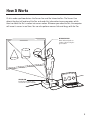
How It Works..............................................................................................................3
Get to Know It...........................................................................................................4
Installing It............................................................................................................5-11
Step 1: Software & Driver Installation..........................................................5
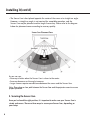
Step 2: Positioning and Connecting the Sensor Cam................................5-6
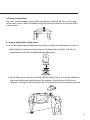
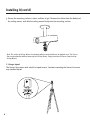
Step 3: Securing the Sensor Cam............................................................6-8
Step 4: Connecting to the Computer...........................................................9
Step 5: Readying the Interactive Pen..........................................................9
Step 6: Calibration................................................................................10-11
Using It....................................................................................................................12
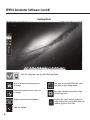
Using IPEVO Annotator Software..........................................................................13-15
FAQ..........................................................................................................................16
Troubleshooting........................................................................................................17