1
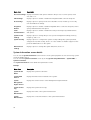
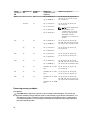
Menu Item
Description
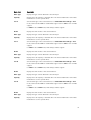
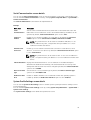
Integrated RAID
Controller
Enables or disables the integrated RAID controller. By default, the option is set to
Enabled.
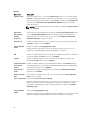
Integrated
Network Card 1
Enables or disables the integrated network card.
Embedded NIC1
and NIC2
NOTE: The Embedded NIC1 and NIC2 option is only available on systems that
do not have Integrated Network Card 1.
Enables or disables the Embedded NIC1 and NIC2 . If set to Disabled, the NIC may
still be available for shared network access by the embedded management
controller. The embedded NIC1 and NIC2 option is only available on systems that
do not have NDCs. This option is mutually exclusive with the Integrated Network
Card 1 option. Configure this function using the NIC management utilities of the
system.
I/OAT DMA Engine Enables or disables the I/OAT option. Enable only if the hardware and software
support the feature.
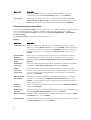
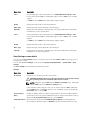
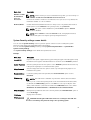
Embedded Video
Controller
Enables or disables the Embedded Video Controller. By default, the embedded
video controller is Enabled. Current state of Embedded Video Controller is
Enabled. Current State of Embedded Video Controller is a read only field,
indicating the current state for the Embedded Video Controller. If the Embedded
Video Controller is the only display capability in the system (that is, no add-in
graphics card is installed), then the Embedded Video Controller is automatically
used as the primary display even if the Embedded Video Controller setting is
Disabled.
Current State of
Embedded Video
Controller
Displays the current state of the Embedded Video Controller. Current State of
Embedded Video Controller is a read only field, indicating the current state for the
Embedded Video Controller
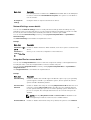
SR-IOV Global
Enable
Enables or disables the BIOS configuration of Single Root I/O Virtualization (SRIOV) devices. By default, the SR-IOV Global Enable option is set to Disabled.
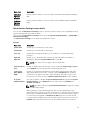
OS Watchdog
Timer
If your system stops responding, this watchdog timer aids in the recovery of your
operating system. When this field is set to Enabled, the operating system is allowed
to initialize the timer. When the option is set to Disabled (the default), the timer will
have no effect on the system.
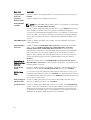
Memory Mapped
I/O above 4GB
Enables or disables the support for PCIe devices that require large amounts of
memory. By default, the option is set to Enabled.
Slot Disablement
Enables or disables the available PCIe slots on your system. The Slot Disablement
feature controls the configuration of PCIe cards installed in the specified slot. Slot
disablement must be used only when the installed peripheral card is preventing
booting into the operating system or causing delays in system startup. If the slot is
disabled, both the Option ROM and UEFI driver are disabled.
44