1
CHECK YOUR SYSTEM REQUIREMENTS
Your Wi-Fi router will connect to any device that supports Wi-Fi, 802.11 b/g/n
A web browser is required to log in to your Wi-Fi router if you wish to make any
configuration changes.
USB driverless connection is also supported for Windows, MAC and LINUX
operating systems:
• Windows 8 (not including RT) / 7 / XP / Vista
• MAC OS X 10.5.11 and above
• Linux
Using the USB connection requires administrator rights to install and run the
software.
We suggest you switch off your anti-virus software before connecting the
router - In some cases protection software can prevent automatic installation.
It is possible to start the installation process manually by clicking the Autorun
icon when it appears.
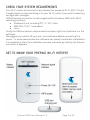
GET TO KNOW YOUR PREPAID WI-FI HOTSPOT
Telstra MF65 User Manual v1.0
Page 2 of 30