1
Using your Extractor
For best performance, you should switch on the extractor 15 minutes before
starting to cook and leave it to run for approximately 15 minutes after the end of
cooking.
A
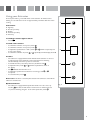
Control Panel
A - Light key
B - Increase speed key
C - Display
D - Decrease speed key
E - Timer key
B
To switch the extractor light on and off
• Touch .
To switch on the extractor
• To switch the extractor on at speed 1, touch
• To switch the extractor on at speed 3, touch
• To adjust the speed between 1 and 4, touch
or
until the required speed shows on the display.
or
repeatedly until the display shows 0.
• To switch the extractor off, touch
The timer
• The extractor is equipped with a timer that allows the extractor to run for a specified period of time between 1 and 99 minutes before switching off automatically. The timer is preset to 15 minutes.
• To activate the timer, select the power level, and then touch .
or
until the required time shows on • To adjust the timer, touch
the display.
will flash when the timer is on.
• The
or
• To adjust the speed level when the timer is running, touch
as required.
• To cancel the timer, touch .
Please note: If the timer is cancelled, the extractor will continue to run until the
extractor is switched off.
Quick start function
• The extractor is equipped with a quick start function for ease of use. By touching
the extractor will switch on and run for 15 minutes at speed one, before switching off again. To cancel the quick start, touch .
C
D
E
Fig. 2
2