1
2
Installation
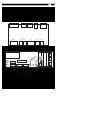
1. Make sure that your PC is turned off.
2. Remove the cover of your PC and the 3.5” front bay cover.
3. Insert the adapter into the open bay and secure it using the small screws provided.
4. Pass the cables from the controller unit throught the supplied rear bay bracket to
outside of the case.
5. Pass the 9-pin serial cable through the bracket to the inside of the computer case.
6. Connect the cable to the socket labelled “COM 1” on the adapter.
COM1
Audio
Out
In
1394
USB2
USB1
7. Connect the rest of the cable to their respective sockets and pass them through the
Line-out
Line-in
or Mic
COM 1
IEEE-1394
USB1
USB2
rear of the computer. Connect then to the adapter..
8. Secure the supplied rear braket to the rear slot on the computer using the medium
screws provided.
9. Make sure that all of the cable connections are secure.
10. Replace the your computer cover.
11. Power on your computer.