1
3
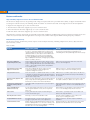
Lower Total Cost of Ownership
In addition to enterprise-class security benefits, the SA 2000, SA 4000, and SA 6000 have a wealth of features that enable low total cost
of ownership.
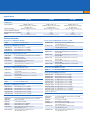
Feature
Feature Description
Benefit
Uses SSL
Secure connection between remote user and internal
resource is via a Web connection at the application layer
Secure remote access with no client software deployment,
maintenance, and no changes to existing servers; no firewall
proxy and network address translation (NAT) traversal issues
Based On Industry-standard
Protocols and Security Methods
No installation or deployment of proprietary protocols
required
The investment in the SA appliance can be leveraged across
many applications and resources over time
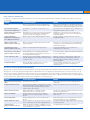
Extensive Directory Integration and
Broad Interoperability
Existing directories in customer networks can be leveraged
for authentication and authorization enabling granular
secure access without recreating those policies
Existing directory investments can be leveraged with no
infrastructure changes; no API’s for directory integration as
it’s all native/built in
Integration with Strong
Authentication and Identity and
Access Management Platforms
Ability to support SecurID, SAML, PKI/digital certificates
Leverages existing corporate authentication methods to
simplify administration
Multiple Hostname Support
(Advanced Software Feature Set)
Ability to host different virtual extranet Web sites from a
single SA appliance
Saves the cost of incremental servers, eases management
overhead, and provides a transparent user experience with
differentiated entry URLs
Customizable User Interface
(Advanced Software Feature Set)
Creation of completely customized sign-on pages
Provides an individualized look for specified roles,
streamlining the user experience
Juniper Networks Central Manager
(Advanced Software Feature Set)
Intuitive Web-based UI for configuring, updating, and
monitoring SA appliances within a single device/cluster or
across a global cluster deployment
Conveniently manage, configure, and maintain SA appliances
from one central location
“In Case of Emergency” (ICE)
Provides licenses for a large number of additional users on
a SA SSL VPN appliance for a limited time when a disaster
or epidemic occurs
Enables a company to continue business operations by
maintaining productivity, sustaining partnerships, and
delivering continued services to customers when the
unexpected happens
Cross-platform Support
Ability for any platform to gain access to resources
(e.g., Windows, Mac, Linux, mobile devices)
Provides flexibility in allowing users to access corporate
resources from any type of device using any type of
operating system
Rich Access Privilege Management Capabilities
The SA 2000, SA 4000, and SA 6000 provide dynamic access privilege management capabilities without infrastructure changes, custom
development, or software deployment/maintenance. This facilitates the easy deployment and maintenance of secure remote access, as
well as secure extranets and intranets. When a user logs in to the SA appliance, they pass through a pre-authentication assessment, and
are then dynamically mapped to the session role that combines established network, device, identity, and session policy settings. Granular
resource authorization policies further ensure exact compliance to security strictures.
Feature
Feature Description
Benefit
Hybrid Role-/Resource-based Policy
Model
Administrators can tailor access
Ensures that security policies reflect changing business
requirements
Pre-authentication Assessment
Network and device attributes, including presence of Host
Checker/Cache Cleaner, results of endpoint security scans,
source IP, browser type, and digital certificates, can be
examined before login is allowed
Results used in dynamic policy enforcement decisions
Dynamic Authentication Policy
Enables administrators to establish a dynamic
authentication policy for each unique session
Leverages the enterprise’s existing investment in directories,
PKI, and strong authentication
Dynamic Role Mapping
Combines network, device, and session attributes to
determine which of three different types of access is
allowed
Enables the administrator to provision by purpose for each
unique session
Resource Authorization
Extremely granular access control to the URL, server, or
file level
Allows administrators to tailor security policies to specific
groups, providing access only to essential data
Granular Auditing and Logging
Can be configured to the per-user, per-resource, per-event
level for security purposes as well as capacity planning
Fine-grained auditing and logging capabilities in a clear, easy
to understand format
Custom Expressions
(Advanced Software Feature Set)
Enables the dynamic combination of attributes on a “persession” basis, at the role definition/mapping rules and the
resource authorization policy level
Finer granularity and customization of policy roles