1
The C3530n MFP Color Multifunction Product brings versatility
and ease of use to the home office or small workgroup.
The user-friendly C3530n MFP puts its full functionality at
your fingertips. The operator panel features a clear, organized
array of navigation buttons, a backlit LCD display and numeric
keypad. A USB port is conveniently located on the front of the
unit and allows for scan-to-memory stick. And the top of the MFP
is designed to tilt back for easy access to the individual toner
cartridges and image drums.
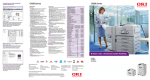
50-sheet ADF: the capacity of
the automatic document feeder
increases user productivity
Flatbed scanner:
handles up to 8.5" x 11"
documents on the glass
and up to 8.5" x 14" via
the ADF
Numeric keypad: easily
enter fax numbers, codes
and quantities
Backlit LCD display: further
simplifies navigation; enhances
user productivity
Scan-to-USB memory
stick: convenient front
port makes the process
quick and easy
Easy-to-access functionality:
primary features are simple to
locate and access
Single Pass Color™ technology:
straight-through paper path
allows for superior flexibility in
paper handling
High Definition Color: printing
technology that ensures
breathtaking output, even
on plain paper
Compact, space-saving design:
the small footprint of the
C3530n MFP allows it to fit into
most work spaces
250-sheet paper tray:
fewer user interventions
means greater productivity
Document management made simple – The C3530n MFP
includes software that lets you move between scan-to tasks
with single click, including Scan-to-Email, Scan-to-Folder and
Scan-and-Print.
PaperPort® software easily turns piles of paper and photos into
PDF and JPEG files—using the MFP’s scanner—and saves them
to your computer for future use.
And OmniPage® optical character recognition (OCR) software
quickly turns hard-copy office documents and forms into
electronic files for easy editing, searching and sharing.
PaperPort from Nuance® is a scanning and
document management application that
turns hard-copy paper into digital content.
OKI® Hot Key software provides a single-click method
for performing common tasks; easily customized to
meet the needs of your workflow environment.
Nuance’s OmniPage OCR software converts
documents into editable electronic files,
saving you time and increasing productivity.