1
This document describes the use of the AP540N-CMK Ceiling Mount to
deploy the Cisco AP541N.
WARNING Insecure mounting might damage the device or cause injury.
Cisco is not responsible for damages or injury incurred by
insecure wall-mounting.
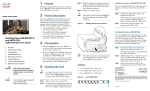
To install the ceiling mount onto the ceiling rail:
STEP 1 Spread the fixture so it fits over the flanges in the ceiling rail.
STEP 2 Compress the fixture to its original, closed position so that it grips
the ceiling rail.
STEP 3 Use the thumbscrew, on the underside of the fixture, to lock the
fixture onto the ceiling rail.
STEP 4 Place the two lugs on the bracket into the holes in the bottom of
the access point with the bracket oriented as shown in the next
figure.
1
Cisco AP541N Ceiling Mount Installation Instructions