1
Ahead of the above mentioned basic control functions, there are various settings
to adjust the sound quality and to have additional functions of the USB
headphone, controlled by the driver/software supplied with the product.
Microphone switch: Select on/off for the built-in microphone. “On”
indication by LED light.
Volume control: step master volume up and down by pressing the
Volume + or Volume – buttons.
Power switch: Select on/off for the USB 5.1 headphone system by the
slide switch. Power “On” indication by LED light.
The USB control box at the headphone cable offers the following direct control
functions without a need of software control:
Headphone Direct Operation
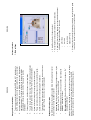
9. There will be a small icon at the lower right corner on the monitor screen
after restart. Please click on the icon to start operation.
8. System will restart after finishing the program installation.
7. Please wait while system may take some time to install the program.
6. System will automatically set driver program under default path.
5. You can choose to install “driver only” or “install driver and demonstration
program at the same time”. Then click "Next" to continue installation.
3. Follow system guide, click "Next" button to start installation.
2. Insert the installation CD in your CD-ROM and open the CD installation
application program. The system will guide the program installation
automatically; otherwise, double-click the "Setup.exe" to start the
installation.
1. Turn on your computer and connect the USB plug of 5.1 headphone to
the PC USB jack, then turn on the power switch on the in-line controller.
Setup and Driver Installation:
ENGLISH
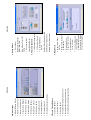
Ls/Lr=+18db
o
Please set the volume of all channels according to the configuration graph
to perform 6 channel output to enjoy 5.1 surround sound.
Subwoofer=+21db
C=+13db
o
o
L/R=+10db
o
Digital Level Control: Allows adjustment of each individual channel
separately. Suggested settings for 6 channels:
Actual Speaker :Click speaker switch window for selections.
Output Device: Select 6 channel output.
1. Main settings
Software Interface
ENGLISH