1
Chapter 1
pages together with a title and a description so that other people can use them. This shareable aspect is
what makes BuzzWatch a read/write application that fully deserves to be called a Web 2.0 application.
What does the name BuzzWatch mean? BuzzWatch is about watching companies, thus the Watch in its
name. With its Yahoo! financial news and del.icio.us panels, the application is good at watching how
the buzz emitted by the companies is perceived, and that’s the reason for the Buzz in its name. If you
need another reason for Buzz, note that like most Web 2.0 applications BuzzWatch is fully buzzword
compliant!
These concepts of aggregating multiple sources and sharing with others are the foundations of the Web
2.0 social layer described in the Introduction. To make the application conform to the technical layer of
Web 2.0, the application uses a number of typical Web 2.0 techniques. The information is presented in
panels that you can close and drag along the page to change its presentation. The title and description
uses edit-in-place techniques that hide the ugly HTML form inputs when you don’t use them, and the
information will be periodically refreshed using Ajax to avoid reloading the page and to support having
different refresh frequencies for each data source.
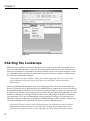
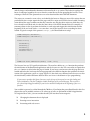
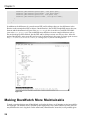
A page is composed of a menu bar, the title and description area, and four panels containing:
❑
A quotation chart
❑
The quotes
❑
The financial news
❑
The latest deli.cio.us bookmarks
The menu bar is composed of four menu items:
❑
File, with two subitems to save a page on the server and create a new one
❑
Go, with a sub item per existing page
❑
Configuration, which opens a new panel to edit the stock symbol and the tag
❑
View, to define which of the four panels should be displayed
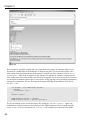
Figure 1-1 shows a sample page with all these elements.
2