1
Chapter 1: The Many Ways to Design a Web Page
When Web designers talk about accessibility, they mean creating a site that
can be accessed by anyone who might ever visit your pages — and that
includes people with limited vision who use special browsers (often called
screen readers) that read Web pages aloud, as well as many others who use
specialized browsers for a variety of other reasons.
If you work for a university, a nonprofit, a government agency, or a similar
organization, you may be required to create accessible designs. But even if
you’re not required to use CSS or to design for accessibility, it’s still good
practice. That’s why Dreamweaver CS3 includes so many CSS features and a
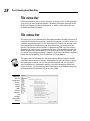
collection of predesigned CSS layouts like the one I used to create the site
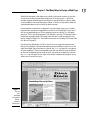
design shown in Figure 1-1. You find instructions for creating CSS layouts like
this one in Chapter 6.
One of the big advantages of CSS is that it lets you separate content from
design. For example, instead of formatting every headline in your site as 24point Arial bold, you can create a style for the <h1> tag and use it to format
all your headlines. Then if you decide later that you want all your headlines
to use the Garamond font instead of Arial, you need to change the style for
the <h1> tag only once in the style sheet and it automatically applies everywhere you’ve used that style.
Figure 1-1:
This site
was
designed
using one of
Dreamweaver’s
CSS layouts.
13