1
Intel Desktop Board DQ77MK Technical Product Specification
2.2 Connectors and Headers .................................................................... 47
2.2.1 Back Panel Connectors ........................................................... 48
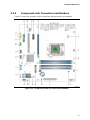
2.2.2 Component-side Connectors and Headers................................. 49
2.3 Jumper Block ................................................................................... 61
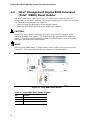
2.4 Intel® Management Engine BIOS Extension (Intel® MEBX)
Reset Header ................................................................................... 62
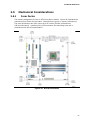
2.5 Mechanical Considerations ................................................................. 63
2.5.1 Form Factor .......................................................................... 63
2.6 Electrical Considerations .................................................................... 64
2.6.1 Power Supply Considerations .................................................. 64
2.6.2 Power Supervisor .................................................................. 65
2.6.3 Fan Header Current Capability ................................................ 65
2.6.4 Add-in Board Considerations ................................................... 65
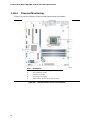
2.7 Thermal Considerations ..................................................................... 65
2.8 Reliability ........................................................................................ 68
2.9 Environmental .................................................................................. 68
3 Overview of BIOS Features
3.1 Introduction ..................................................................................... 69
3.2 BIOS Flash Memory Organization ........................................................ 70
3.3 Resource Configuration ..................................................................... 70
3.3.1 PCI Express Autoconfiguration ................................................ 70
3.4 System Management BIOS (SMBIOS) ................................................. 71
3.5 Legacy USB Support ......................................................................... 71
3.6 BIOS Updates .................................................................................. 72
3.6.1 Language Support ................................................................. 72
3.6.2 Custom Splash Screen ........................................................... 73
3.7 BIOS Recovery ................................................................................. 73
3.8 Boot Options .................................................................................... 74
3.8.1 Optical Drive Boot ................................................................. 74
3.8.2 Network Boot........................................................................ 74
3.8.3 Booting Without Attached Devices ........................................... 74
3.8.4 Changing the Default Boot Device During POST......................... 74
3.9 Adjusting Boot Speed ........................................................................ 75
3.9.1 Peripheral Selection and Configuration ..................................... 75
3.9.2 BIOS Boot Optimizations ........................................................ 75
3.10 BIOS Security Features ..................................................................... 76
3.11 BIOS Performance Features ............................................................... 77
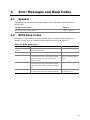
4 Error Messages and Beep Codes
4.1
4.2
4.3
4.4
4.5
viii
Speaker .......................................................................................... 79
BIOS Beep Codes ............................................................................. 79
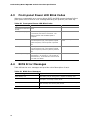
Front-panel Power LED Blink Codes ..................................................... 80
BIOS Error Messages ........................................................................ 80
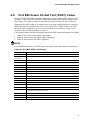
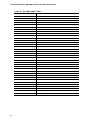
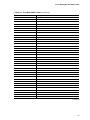
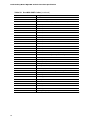
Port 80h Power On Self Test (POST) Codes .......................................... 81