1
CONTENTS
Installation...................................................3
SD/MMC operation................................... 11
Bluetooth operation .................................. 12
Preparing for operation ........................ 12
DIN Front-Mount (Method A) ...................3
Installing the unit....................................3
Removing the unit .................................4
ISO connection ..........................................7
Pairing .................................................... 13
Connect .................................................. 13
T-menu ................................................... 13
Making an outgoing call ....................... 14
Transfer the call between mobile phone
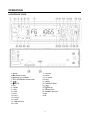
Location of keys.........................................8
and the unit ............................................ 14
Basic operation ..........................................9
Switching on/off the unit ...........................9
Faceplate release ......................................9
Bluetooth audio (A2DP function) ........ 14
Remote Control…….…………………...17
Specification .............................................. 18
Trouble shooting ....................................... 19
DIN Rear-Mount (Method B)....................5
Using the detachable front panel ............6
Wiring Connection .....................................7
Sound adjustment .....................................9
Loudness ....................................................9
Display.........................................................9
Equalization ................................................9
Reset function ............................................9
Mode selection...........................................9
System setting ...........................................9
Auxiliary input.............................................10
Radio operation .........................................10
Selecting the frequency band ..............10
Selecting a station .................................10
Automatic memory storing & program
scanning..................................................10
Scan.........................................................10
Station storing ........................................10
USB play operation ...................................10
Switching to USB mode........................10
Selecting files .........................................10
Pausing playing .....................................10
Previewing all files.................................10
Repeating the same file........................10
Playing all files in random ....................10
Selecting directory up/down ................10
Selecting tracks .....................................11
Display ID3 information………………11
2