1
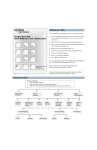
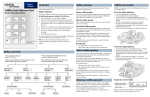
Playing messages
From your telephone:
1. Enter the CallPilot system number and then enter the CallPilot extension.
2.
3.
Enter your mailbox number and password and press £.
Follow the voice prompts and press the dialpad keys for the features you want to use.
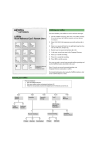
Press 2 to listen to new messages, or 6 to listen to saved messages.
‹
¤
Record Message
Listen to New Messages
⁄⁄
⁄*
Skip
Backward
‹*
¤*
Pause/
Continue
fl
‹‹* ›
Previous
Message
Skip
Forward
°
Mailbox Administration
Listen to Saved Messages
fi
fl
‡
Forward
Copy
Next
Message
Message
Envelope
Skip to
End
* Applies only when message is playing.
°
·
Delete
Message
Reply to
Message
‡‡
Save
Message
Replay
••*
Return to
Main Menu
To retrieve a deleted message
You can retrieve a deleted message if you are still in a CallPilot session. A deleted
message remains in your mailbox until you end your current CallPilot session. If
you have listened to all your new and saved messages, you can play and retrieve
your deleted messages.
Press ¤ to listen to your deleted messages. When you play your deleted message,
you have the option to save it. If you end the session without saving the deleted
message, it is permanently deleted from your mailbox.
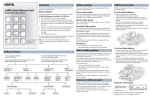
Sending messages
From your telephone:
1. Enter the CallPilot system number and then enter the CallPilot extension.
2.
3.
Enter your mailbox number and password and press £.
Follow the voice prompts and press the dialpad keys for the features you want to use.
Press 3 to compose a message.
‹
¤
Listen to New Messages
fl
Record Message
°
Mailbox Administration
Listen to Saved Messages
£
End Recording
⁄
Replay
¤
£
Erase
Accept
Enter Mailbox Number
⁄
Certified
£
‹
Send
Delivery
Options
¤
Urgent
›
Add
Recipients
‹
›
Private
Timed
Delivery