1
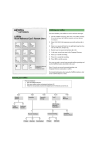
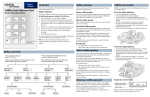
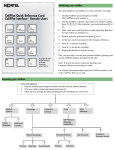
Playing messages
From your telephone:
1. Enter the CallPilot extension.
2.
3.
Enter your mailbox number and password and press £.
Follow the voice prompts and press the dialpad keys for the features you want to use.
‹
¤
Record Message
Listen to New Messages
⁄⁄
⁄*
Skip
Backward
‹*
¤*
Pause/
Continue
fl
Previous
Message
Mailbox Administration
Listen to Saved Messages
fi
fl
‡
Forward
Copy
Next
Message
Message
Envelope
‹‹* ›
Skip
Forward
°
Skip to
End
* Applies only when message is playing.
‡‡
°
·
Delete
Message
Reply to
Message
Save
Message
Replay
••*
Return to
Main Menu
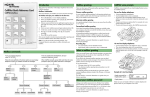
To retrieve a deleted message
To forward your calls
You can retrieve a deleted message if you are still in a CallPilot session. A deleted
message remains in your mailbox until you end your current CallPilot session.
1.
From your telephone press ≤›.
2.
Enter the extension you want to forward your calls
to, or the CallPilot extension if you want to forward
your calls to your mailbox. (Press ≤·°fi to
display the CallPilot extension.)
3.
The display shows your calls are forwarded.
4.
To cancel forwarding, press ≤£›.
Press ¤ to listen to your deleted messages. When you play your deleted message,
you have the option to save it. If you end the session without saving the deleted
message, it is permanently deleted from your mailbox.
Sending messages
From your telephone:
1. Enter the CallPilot extension.
2.
3.
Enter your mailbox number and password and press £.
Follow the voice prompts and press the dialpad keys for the features you want to use.
‹
¤
Listen to New Messages
fl
Record Message
°
Mailbox Administration
Listen to Saved Messages
£
End Recording
⁄
Replay
¤
£
Erase
Accept
Enter Mailbox Number
⁄
Certified
£
‹
Send
Delivery
Options
¤
Urgent
›
Add
Recipients
‹
›
Private
Timed
Delivery