1
Shooting Operation
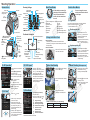
Nomenclature
Mode Dial
<i> ISO speed
setting button
<D> Flash
button
<6>
Main Dial
Shutter button
Y
P
CO
<O> Aperture/Exposure
compensation button
<A> Live View
shooting/
Movie shooting
button
Auto Lighting Optimizer
Shooting mode
ISO speed
Picture Style
Metering mode
AF operation
Image-recording
quality
zxcn
<S> AF point
selection button
<S>
cross keys
<L>
Erase
button
Access
lamp
f: AF OperationN
Y
P
CO
oo Press the <S> button.
oo Press the <S> cross keys to
select the AF point.
oo While looking through the
viewfinder, you can select the
AF point by turning the <6>
dial until the desired AF point
flashes in red.
oo Pressing <0> toggles the
AF point selection between the
center AF point and automatic
AF point selection.
Y
P
O
Possible shots
Drive/self-timer
C
AScene Intelligent Auto
7Flash Off
CCreative Auto
2 Portrait
3Landscape
4 Close-up
5Sports
Viewfinder Information
AF point activation indicator <•>
Spot metering
circle
AF points
Focus
confirmation light
AE lock
Flash-ready
Flash exposure
compensation
Shutter speed
Aperture
Max. burst
Y
P
O
C
Using the Built-in Flash
Basic Zone Modes
If necessary, the built-in flash will be raised and fire
automatically in low-light or backlit conditions (with certain
shooting modes).
Creative Zone Modes
You can change the camera
settings as desired to shoot in
various ways.
d: Program AE
The camera automatically sets the shutter speed and
aperture in the same way as the <A> mode.
oo Set the Mode Dial to <d>.
Y
P
CO
s: Shutter-priority AE
oo Set the Mode Dial to <s>.
oo Turn the <6> dial to set the
desired shutter speed, then
focus the subject.
XX The aperture will be set automatically.
oo If the aperture display blinks, turn
the <6> dial until it stops blinking.
f: Aperture-priority AE
oo Set the Mode Dial to <f>.
oo Turn the <6> dial to set the desired
aperture, then focus the subject.
XX The shutter speed will be set automatically.
oo If the shutter speed display
blinks, turn the <6> dial until
it stops blinking.
oo Press the <D> button to raise the
built-in flash, then shoot.
ISO speed
Exposure level indicator
A Live View Shooting
oo Press the <i> button.
oo Press the <Y> <Z> keys or turn
the <6> dial to select the ISO
speed, then press <0>.
oo When [AUTO] is selected, the
ISO speed is set automatically.
When you press the shutter
button halfway, the ISO speed
setting is displayed.
i Drive Mode
D
8 Special scene
C Kids
P Food
x Candlelight
6 Night Portrait
F Handheld Night Scene
GHDR Backlight Control
Creative Zone Modes
Monochrome shooting
i: ISO SpeedN
oo Set the lens focus mode switch
to <f>.
oo Select [z3: AF operation],
then press <0>.
oo Press the <Y> <Z> keys to select
the AF operation, then press <0>.
X(One-Shot AF):
For still subjects
9(AI Focus AF):
Switches the AF operation automatically
Z(AI Servo AF):
For moving subjects
All the settings necessary for
shooting are set automatically.
You just press the shutter
button, and the camera does
the rest.
Aperture
Battery check
<A> AE lock
button
<Q/0> Quick Control button/
Setting button
Shutter speed
White balance
Exposure level
indicator
Quick Control
icon
Focus mode switch
S AF PointN
Basic Zone Modes
Shooting Settings
Power switch
C
Y
P
O
oo Select [z1: Drive/self-tmr],
then press <0>.
oo Press the <Y> <Z> keys to select
the drive mode, then press <0>.
u :Single shooting
i :Continuous shooting
B:Silent single shooting*
M:Silent continuous shooting*
Q :Self-timer:10 sec./
Remote control
l :Self-timer:2 sec.
q :Self-timer:Continuous
* Not selectable in Basic Zone modes.
k Movie Shooting (Autoexposure)
oo Press the <A> button to display
the Live View image.
oo Set the power switch to <k>.
oo Set the Mode Dial to any
shooting mode except <a>.
oo Press the shutter button halfway
to focus.
oo Press the <A> button to start
shooting a movie.
oo To stop movie shooting, press
the <A> button again.
Y
P
O
oo Press the shutter button
completely to take the picture.
C
oo Number of Possible Shots (Live View Shooting)
Temperature
No Flash
50% Flash Use
At 23°C / 73°F
Approx. 160 shots Approx. 150 shots
Y
P
CO
Recording movie
Microphone