1
2 Using the Pens and the Control Pad
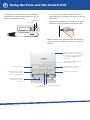
The projector came with 2 pens that have different
colored ends, orange and blue. Make sure one AA
battery is installed in each pen.
Battery light
Power switch
• To turn on the pen, slide the power switch. The
green light comes on briefly. If the battery is low, the
light flashes.
• Hold the pen perpendicular to the board, as shown
below. Do not cover the black section of the pen.
Note: The pens turn off automatically after about 20
minutes of inactivity. Slide the switch to turn the pen
back on.
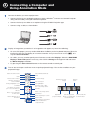
Remove the top cover to install
batteries or connect the control pad
to the projector or to a printer. See
the online User’s Guide for more
information.
Select whiteboard mode (turns on
the projector if it is off)
Turn projector on/off
Select from various image sources
connected to the projector
Capture the projected image
(switch to whiteboard to
paste the captured image)
Save the projected image
Connect USB cable from
computer (on bottom of
control pad)
Print the
projected image
Connect USB thumbdrive