1
The front panel
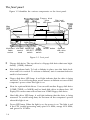
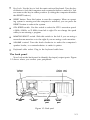
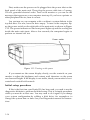
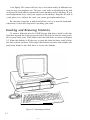
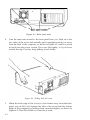
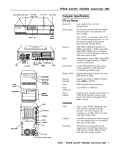
Figure 1-2 identifies the various components on the front panel.
P;;;r Ha;;v$sk F l o p p y d i s k
drive
lamp LED lamp
LED lamp
~/-!~j
~~
Disk lock/
release latch
\:j<g
RESET button
Keyboard VOLUME MONITOR
cable
control
SELECT SPEED
knob
socket
switch
switch
Optional
disk drive
slots
Figure 1-2. Front panel
Floppy disk drive. The top drive is a floppy disk drive that uses highdensity (1.2MB) diskettes.
Disk lock/release latch. To lock a diskette in place, turn this latch clockwise until it is vertical. To release a diskette, turn it counterclockwise
until it is horizontal.
Floppy disk drive LED lamp. A red light indicates that the drive is being
accessed. To avoid losing data, never remove a diskette or turn off the
computer’s power when this light is on.
Slots for optional disk drives. You can add another floppy disk drive
(1.2MB, 720KB, or 360KB) and/or hard disk drive in these slots. All
Equity III+ units come with at least one 1.2MB floppy disk drive.
Hard disk drive LED lamp. A red light indicates that the drive is being
accessed. To avoid losing data, do not turn off the computer’s power
when this light is on.
Power LED lamp. When the light is on, the power is on. The light is red
if the CPU (central processing unit) speed is 6 MHz, orange for 8 MHz,
and green for 10 MHz.
1-4