1
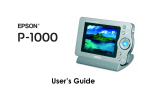
P-1000 Parts
P-1000 Control Panel
ACCESS light
PRINT button
Flashes orange briefly
when you turn on the
P-1000 or access data
Displays the
Print menu
Eject button
MENU button
Displays the Pop-up menu
Memory card slot
Arrow button
Power switch
Press , , , or to
select a photo or an
option in a menu
Activity light
Flashes during power on
and off, printing, and
certain other operations
CANCEL button
CHARGE light
Flashes green when the
battery is being charged
Cancels the current operation
and returns to the previous
Selects a highlighted
screen or the Main Menu
option, opens the
selected folder or photo,
and zooms into a image
OK button
LCD
P-1000 Main Menu
Video output
connector
Whenever you turn on the P-1000, the Main menu appears.
All functions are started here.
Battery life icon
Control panel
Battery cover
Reset button
USB interface
connector
Shortcut icon for selecting
your favorite albums
AC adapter
connector
Message area
Battery cover
release
If you are viewing pictures or copying or deleting files, you can
return to the Main Menu by pressing Cancel.
Connector cover