1
Configuration 2 – AP-60 IR Volume Control
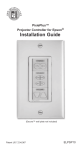
In this configuration the PixiePlus will control the volume level of the AP-60 directly with
IR codes. If you have multiple audio sources, you should consider how to handle audio
switching before implementing this configuration. Connect audio devices to the AP-60 as
shown in the AP-60 Installation Guide.
Note: This configuration requires reprogramming the PixiePlus volume buttons with IR
volume commands for the AP-60. For complete instructions on reprogramming PixiePlus
buttons, see the PixiePlus Installation Guide, pages 8 and following.
A. Wire the IR output from
the PixiePlus Ceiling Plate
to the IR receiver window
on the AP-60 (see the
PixiePlus Installation Guide,
pages 6-7).
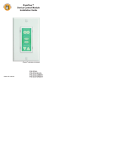
B. To reprogram the
PixiePlus volume buttons with IR volume commands, insert a paper clip into the small
opening on the lower-right of the PixiePlus labeled Insert paper clip here to enter
learning mode. The learning mode indicator LED on the PixiePlus will begin flashing red.
If it does not, be sure the PixiePlus is powered.
C. Press the Volume Down button on the PixiePlus a single time. It will beep once,
indicating that it is armed for learning an IR code. Hold the AP-60 remote control
perpendicular to the PixiePlus about 2-3 inches from the IR receiver labeled aim remote
here to be learned in the upper-right of the frame. Press the Volume - button on the
remote control for about a second, then release it. The PixiePlus will beep three times to
indicate that the code has been learned correctly. If you do not hear the confirmation
beeps, repeat these steps.
D. Press the Volume + button on the PixiePlus to arm it for learning. Repeat the process
described in step 3, except pressing the Volume + button on the AP-60 remote control.
E. When the volume buttons are successfully reprogrammed, remove the paper clip to
return the PixiePlus to normal operation.
Note: Reprogramming any button erases the code that is already in place.
F. To restore the PixiePlus to its factory default preconfiguration. Simply place the
PixiePlus in learning mode by inserting the paper clip, then press and hold any two
buttons on the PixiePlus for 5 to 10 seconds. When the unit beeps three times, it will be
restored to its factory default configuration.
2