1
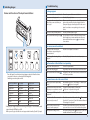
■ Connection Examples
Connecting Using a Computer Cable
Connecting with HDMI Cables
HDMI
If you output
audio
MHL
Connect the ports in either of the following combinations.
When using [Computer1] input port
[Audio1] port
When using [Computer2] input port
[Audio2] port
If you use a thick HDMI cable, it may disconnect under its own weight.
Use the HDMI cable clamp to secure the cable.
Connecting Using a USB Cable
If you output
audio
•• For projectors which audio can be input with the USB cable in the USB
Display function, there is no need to connect the audio cable.
•• Be sure to connect the projector and the computer directly, not via a
USB hub.
•• When the projector only has one HDMI port, make sure you connect the HDMI
cable to the [HDMI1/MHL] port.
•• You may not be able to connect an MHL cable to all devices. Also, depending on
the model or settings of the device, images may not be projected correctly.
•• When connecting an MHL cable, make sure the cable meets the MHL standards.
If the cable does not meet the MHL standard, the connected device may
malfunction.
•• If you connect using a commercially available MHL-HDMI conversion adapter,
you may not be able to charge the connected device or you may not be able to
perform operations from the projector's remote control.
•• If images are not projected correctly using an MHL cable, disconnect and then
reconnect the MHL cable.
•• If you switch the HDMI1/MHL source and the HDMI2 source while playing a movie,
the movie may freeze. Stop the movie before switching sources.
2