1
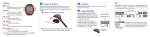
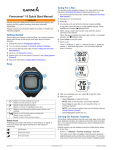
• On the Virtual Partner® page,
press and hold to adjust the
Virtual Partner pace. (Optional
foot pod must be paired to view
Virtual Partner page.)
➌ LAP/RESET
• Press to create a new lap.
• In training mode, press and hold
to save your activity.
• In history mode, press and hold
to delete an activity.
➎ MODE
• Press to change modes.
• Press to exit a menu or page.
Your settings are saved.
• Press and hold to switch sport
modes.
➍ START/STOP/ENTER
• In training mode, press to start or
stop the timer.
• Press to confirm and advance to
the next setting.
• In time mode, press and hold for
the watch setup menu.
FR70 Quick Start Manual
3