1
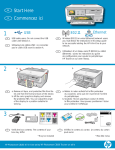
Get to know the HP Photosmart
English
1
Back:
2
Cancel:
3
OK:
Returns to the previous screen.
Stops the current operation, restores default
settings, and clears the current photo
selection.
Selects a menu setting, value, or photo.
4
Scan:
5
Photo:
6
Copy:
7
Wireless network indicator light:
Opens the Scan/Wireless Menu. When viewing screens other than the Home screen, selects options
related to the current display.
Opens the Photo Menu. When viewing screens other than the Home screen, selects options related to
the current display.
Opens the Copy Menu. When viewing screens other than the Home screen, selects options related to
the current display.
Indicates that the wireless radio is on.
Get the most out of your HP Photosmart
Print your photos without connecting to a
computer— just insert your memory card
into a slot on the HP Photosmart and start
printing.
Print on a variety of specialty media such
as transparencies and envelopes.
Make color or black-and-white copies.
Scan originals to a memory card or a
connected computer.
Connect the HP Photosmart to as many
as five computers over a wireless
network.