1
A1 - USB
Windows:
EN
ES
EN
ES
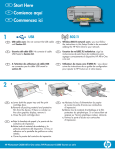
a. Turn on your computer, login if necessary, and
then wait for the desktop to appear. Insert the
green CD and follow the onscreen instructions.
IMPORTANT: If the startup screen does not appear,
double-click My Computer, double-click the
CD-ROM icon with the HP logo, and then doubleclick setup.exe.
a. Encienda el equipo, inicie la sesión si es necesario
y, a continuación, espere a que aparezca el
escritorio. Introduzca el CD verde y siga las
instrucciones que aparecen en pantalla.
IMPORTANTE: Si no aparece la pantalla de
inicio, haga doble clic en Mi PC, haga doble
clic en el icono CD-ROM con el logotipo HP y,
a continuación, haga doble clic en setup.exe.
IMPORTANT: Purchase a USB cable separately if it is
not included.
b. Once the USB prompt appears, connect the USB
cable to the port on the back of the HP All-in-One,
and then to any USB port on the computer.
c. Follow the onscreen instructions to complete the
software installation.
d. Go to page 9 to explore your HP All-in-One.
IMPORTANTE: Compre un cable USB por separado si
no está incluido.
b. Cuando aparezca el indicador USB, conecte el
cable USB al puerto ubicado en la parte posterior
del dispositivo HP All-in-One y, a continuación, a
cualquier puerto USB del equipo.
c. Siga las instrucciones que aparecen en pantalla
para completar la instalación del software.
d. Vaya a la página 9 para examinar el dispositivo
HP All-in-One.
6 • HP Photosmart C6200 All-in-One series
Mac:
EN
ES
EN
ES
IMPORTANT: Purchase a USB cable
separately if it is not included.
a. Connect the USB cable to the port on the
back of the HP All-in-One, and then to any
USB port on the computer.
IMPORTANTE: Compre un cable USB por
separado si no está incluido.
a. Conecte el cable USB al puerto ubicado
en la parte posterior del dispositivo
HP All-in-One y, a continuación, a
cualquier puerto USB del equipo.
b. Insert the green CD.
c. Double-click the HP Photosmart CD icon on
the desktop.
d. Double-click the HP All-in-One Installer
icon. Follow the onscreen instructions.
e. Complete the Setup Assistant screen.
f. Go to page 9 to explore your
HP All-in-One.
b. Inserte el CD verde.
c. Haga doble clic en el icono del CD de
HP Photosmart del escritorio.
d. Haga doble clic en el icono HP All-in-One
Installer. Siga las instrucciones que
aparecen en pantalla.
e. Complete la pantalla Asistente de
instalación.
f. Vaya a la página 9 para examinar el
dispositivo HP All-in-One.