1
Phone Calls
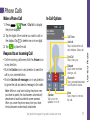
In-Call Options
1. Press
>
Phone > Dial tab to display
the phone dialpad.
2. Tap the digits of the number you want to call on
the dialpad. Tap
to delete one or more digits.
3. Tap
to place the call.
Call Timer
Add call
Tap to add another call
and initiate a 3-way call.
Respond to an Incoming Call
End Call
Tap to hang up.
•On the incoming call screen, flick the Answer icon
in any direction.
•Flick the Decline icon in any direction to send the
call to your voicemail inbox.
•Flick the Decline with message icon in any direction
to ignore the call and send a message to the caller.
Note: While on a call and holding the phone near
your face to speak, the touchscreen automatically
deactivates to avoid accidental screen presses.
When you move the phone away from your face,
the touchscreen automatically reactivates.
Dialpad
Tap to enter numbers
during a call.
Bluetooth
Tap to activate/deactivate
your Bluetooth device.
Speaker
Tap to turn the
speaker on or off.
visit sprint.com/support for guides, tutorials and more
Mute
Tap to mute or unmute
the call.
11
Use Your Phone
Make a Phone Call