1
Text Messaging
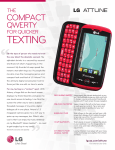
When you need to communicate quickly and privately,
send a text message. Attune features bubble-threaded
messaging and chat view to make keeping up with your
conversations even easier.
Send a Message
1. From standby mode and with the slide open, press
2.Enter a number in the To field or tap
to access your contact list.
3.Tap the Text field and enter your message.
4.Tap Send.
Reply to a Message
1. Your phone will alert you when you receive a
new text message. Tap View Now.
2.Tap Chat to view your message history with
that contact. Otherwise, tap Reply.
3.Enter a message and tap Send.
Bubble-Threaded Messaging
1. From standby mode, swipe right on the screen to
move left to the Messaging home screen.
2.Tap a bubble to view the full message and reply.
3.Tap Reply.
4.Enter a message and tap Send.
.