1
ENGLISH
6.
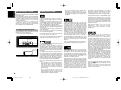
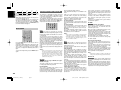
To move back and forth between the
characters, press the TUNING / button or
press 4 / ¢ buttons on the remote.
Note:
• Unused columns should be filled by entering
blanks.
To save name, press the MEMORY button,
press MEMO button on the remote for more
than 2 seconds.
• You can input the alphabetic and numeric
characters with the ten keypad of the remote
control in the previous step 4 and 5.
7.
S-DIRECT
AUTO
1
2
3
NIGHT
CSII
EX/ES
DSP
4
5
6
DISPLAY
M-CH ST
STEREO
7
8
9
CLEAR
MEMO
A/D
P.SCAN
DTS
6.1CH IN
0
CHANNEL/SKIP
8.
BASS
TREBLE
MODE
7.
8.
TUNE/SEARCH
DISP./RDS
F.DIRECT
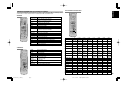
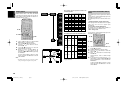
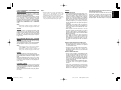
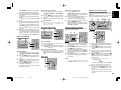
Enter the character using the ten keypad. For
example, to enter “A”:
1) Press the “1” button. “A” appears on the
display column.
2) Every time the 1 button is pressed, the
displayed character changes in the order: A
→ B → C → 1 → A...
Pressing buttons other than the “1” button
cause different characters to be displayed in a
similar way, so that other alphanumeric
characters can be entered. To enter a blank
or space, press the “9” button.
When the desired character is displayed,
press the MEMO button to confirm the entry in
this column and move to the next column.
After having filled all of the 8 columns, press
the MEMO button, for more than 1 second to
confirm the entry.
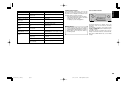
TROUBLESHOOTING
In case of trouble, check the following before
calling for service:
1. Are the connections made properly ?
2. Are you operating the unit properly following
user’s guide ?
3. Are the power amplifiers and speaker working
properly ?
If the unit does not operate properly, check items
shown in the following table.
If your trouble cannot be recovered with the
remedy actions listed in the following table,
malfunction of the internal circuitry is suspected;
immediately unplug the power cable and contact
your dealer, nearest Marantz distributor or the
Marantz Service Center in your country.
SYMPTOM
CAUSE
SR4400 cannot be turned up.
The power plug is not connected.
Cancel mute using the remote control unit.
No sound and picture are Mute is on.
output even when power is on.
The input cable is not connected See the connection diagram and connect the
cables correctly.
correctly.
The master volume control is turned all Adjust the master volume.
the way down.
The function selector position is wrong. Select correct position.
Speaker does not outputting The headphones are connected to the Disconnect the headphones. (Speakers will not
output sound when headphones are connected.)
any sound.
headphone jack.
Sound and pictures from other Input cable connected incorrectly.
than equipment selected with
the function selector.
Connect the cable correctly by referring to the
connection diagram.
Sound from the wrong channel Speaker cable connected incorrectly.
is output from the speaker.
Connect the cable correctly by referring to the
connection diagram.
No sound is output from the The center speaker cable connection is Connect the cable correctly.
center speaker.
incomplete.
STEREO has been selected for When STEREO is selected for Surround mode, no
sound will be output from the center speaker. Set
Surround mode.
another Surround mode.
Center = NONE has been selected in Make the correct setting.
SETUP mode.
No sound is output from the T h e s u r r o u n d s p e a k e r c a b l e Connect the cable correctly.
surround speakers.
connection is incomplete.
STEREO has been selected for When STEREO has been selected for Surround
mode, no sound will be output from the surround
Surround mode.
speaker. Set another Surround mode.
Surround = NONE has been selected in Make the correct setting.
SETUP mode.
No sound is output from the The surround back speaker cable Connect the cable correctly.
surround back
connection is incomplete.
Surround mode is not EX/ES mode.
Surround back = NONE has been Make the correct setting.
selected in SPEAKERS SIZE SETUP.
Input signal is incompatible.
Use 5.1channel source.
Can not select Pro Logic II Input signal is incompatible.
mode.
Use 2 channel Dolby Digital input signal, PCM input
signal or analog input signal.
Can not select Neo:6 mode.
Use PCM input signal or analog input signal.
Input signal is incompatible.
28
Page 28
Set surround mode EX/ES.
Surround back = NONE has been Make the correct setting.
selected in SPEAKERS SIZE SETUP.
Can not select EX/ES mode.
SR4400U DFU_01_ENG 2_2
REMEDY
Connect the power plug to the outlet.
03.4.10, 3:01 PM
Adobe PageMaker 6.5J/PPC