1
ENGLISH
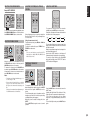
LEARN MODE
4.
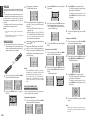
This remote control is capable of learning and storing
codes used by other remote controls that you already
own.
For codes which are not learned, the remote control
will transmit either the Marantz preset codes from
the initial settings, or remote codes from another
manufacturer’s AV equipment which is set by the
customer.
The receiver sensor for the remote control signals is
located at the top of the remote control.
1.
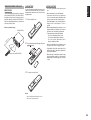
Place the remote controller so that its infrared
signal transmitter is facing the infrared signal
receiver on the Marantz remote controller at a
distance of about 0.05 m (2 inches).
Select the SOURCE button to select the button
to be erased.
BASS
3.
TREBLE
l/
SLEEP
DISPLAY
AUTO
1
CS
4
5.
Notes:
• This remote control is capable to learn around 60
codes.
• When the batteries are getting weak , the learing
procedure is not successful.
LEARNING PROCEDURE
2.
Select the button to be learned.
• LEARN indicator lights up.
P.DIRECT
SURROUND
dts
LIP SYNC/
INPUT
2
3
EX/ES
VIRTUAL
5
6
TV
DVD
VCR
TUNER
CD
CDR
MD
TAPE
AUX1
AUX2
AMP
DSS
• To cancel the erasing operation, do not
press ENTER button and simply touch any
other button.
T.MODE
REMOTE CONTROLLER
RC5001SR
Press and hold the button of the original remote
controller to learn until the SEND indicator
blinks twice.
• When the SEND indicator blinks once,
repeat this step.
• When the memory of the RC5001SR is
full, the LEARN and SEND indicators blink
once. If you want to learn the code, you
should erase other learned button.
6.
Repeat steps 4 and 5 to learn other buttons in
same SOURCE.
7.
8.
Repeat steps 3 to 6 to learn other SOURCE.
3.
INFO
Press and hold down the SLEEP button and
press the learned button twice to be erased.
• SEND indicator blinks twice and the mode
returns to LEARN mode.
ENTER
T.TONE
/SET UP
4.
SOURCE
SET
OFF
ON
DISPLAY
P.DIRECT
SURROUND
dts
LIP SYNC/
INPUT
l/
SLEEP
AUTO
1
4.
2
MENU
EXIT
To return the NORMAL mode, press the SET
button.
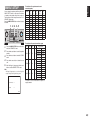
Erasing the all SOURCES
3
1.
To return the NORMAL mode, press the SET
button.
Press and hold down the SET and MENU
buttons until LEARN indicator blinks.
MULTI/ CAT
SOURCE
SET
OFF
ON
DISPLAY
P.DIRECT
SURROUND
dts
LIP SYNC/
INPUT
M-SPKR
l/
When you have finished programming the
remote controller, press the SET button, then
LEARN indicator stops blinking and exits from
the LEARN mode.
SLEEP
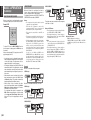
Erasing the code by SOURCE
1.
AUTO
Press and hold down the SET and MENU
buttons until LEARN indicator blinks.
MULTI/ CAT
LEARN
SET
OFF
ON
DISPLAY
P.DIRECT
SURROUND
dts
LIP SYNC/
INPUT
1
2.
M-SPKR
SEND
SOURCE
l/
SLEEP
5
0.0
Press ENTER button to continue erasing.
• The SEND indicator blinks twice and the
mode returns to LEARN mode.
m
SOURCE
SET
OFF
ON
DISPLAY
P.DIRECT
SURROUND
dts
LIP SYNC/
INPUT
l/
SLEEP
AUTO
1
AUTO
2
INFO
MENU
3
2
INFO
3
MENU
ENTER
Press and hold down the SLEEP button and
press POWER ON and POWER OFF button.
• LEARN indicator lights.
ENTER
SOURCE
SET
OFF
ON
DISPLAY
P.DIRECT
SURROUND
dts
LIP SYNC/
INPUT
l/
SY
ST
EM
RE
MO
RC55
00SR
TE
CO
NT
RO
LLE
R
2.
Press and hold down the SET and MENU
buttons until LEARN indicator blinks.
MULTI/ CAT
SOURCE
SET
OFF
M-SPKR
ON
l/
SLEEP
3.
2
P.DIRECT
SURROUND
dts
LIP SYNC/
INPUT
INFO
3
Press and hold down the SLEEP button and
press the learned SOURCE button twice to be
erased.
• LEARN indicator lights.
CH-SEL
SOURCE
SET
OFF
ON
DISPLAY
P.DIRECT
SURROUND
dts
LIP SYNC/
INPUT
l/
SLEEP
1
MENU
ENTER
Select the SOURCE button to select the
SOURCE.
BASS
2
3
V-OFF
ATT.
TV
DVD
VCR
TUNER
CD
CDR
MD
TAPE
AUX1
AUX2
AMP
BASS
AUTO
1
3.
TREBLE
DSS
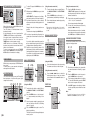
ERASING PROGRAMMED CODES
(RETURNING TO INITIAL SETTINGS)
2
3
Press ENTER button to continue erasing.
• The SEND indicator blinks twice and the
mode returns to LEARN mode.
• To cancel the erasing operation, do not
press ENTER button and simply touch any
other button.
INFO
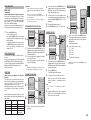
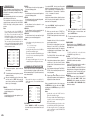
Codes can be erased in three ways: by buttons,
sources, and by all memory contents.
MENU
ENTER
T.TONE
/SET UP
EXIT
TREBLE
TV
DVD
VCR
TUNER
CD
CDR
DSS
MD
TAPE
AUX1
AUX2
AMP
Erasing the code by buttons
1.
Press and hold down the SET and MENU
buttons until LEARN indicator blinks.
REMOTE CONTROLLER
RC5001SR
MULTI/ CAT
SOURCE
SET
OFF
ON
SLEEP
DISPLAY
P.DIRECT
SURROUND
dts
LIP SYNC/
INPUT
AUTO
1
2
3
4.
To return the NORMAL mode, press the SET
button.
M-SPKR
l/
16
2.
AUTO
DISPLAY
AUTO
1
Notes:
• When the SEND indicator blinks once again, the
transmitting code is unavailable for RC5001SR, or
the transmitting signal is intercepted by noise.
• If no buttons are pressed for approximately 1
minutes while in the LEARN mode, the remote
controller automatically exits from the LEARN
mode.
SLEEP
INFO
MENU
ENTER
Note:
Erasing codes will return to the factory preset code,
or there will leave empty if the button has no factory
preset code.