1
flicks settings 21
free software downloads 49
G
GPS
using 41
GPS receiver 7
H
handwriting panel 29, 30
hibernate 53
about 40
I
integrated microphones 31
K
keyboard 59
Windows 8 on-screen 29
Know Your Motion Tablet 20, 28
Accessories 28
Getting Started 28
Support 28
User’s Guide 28
knowledge base 60
L
left- or right-handed options 23
left-handedness 59
Location Services 27
lock and unlock the Tablet PC 16
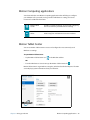
Motion Computing applications
Know Your Motion Tablet 28
Motion Tablet Center 20
Motion Optimized power plan 26, 40
Motion Tablet Center 20
Advanced settings, Power 26
Advanced settings, Tablet 24
Compass 27
flicks settings 21
Location Services 27
Pen and Touch settings 21
power settings 25
sensors settings 27
Show Map 28
Tablet PC settings 22
tablet settings 21
Touch Settings 23
touch settings 22
using 20
Wireless Settings 23
Wireless settings 24
O
optimization
battery 39
power plan 26, 40
optional features 7
Computrace® Complete 8
mobile broadband with GNSS 7
security 8
TPM 8
P
M
Magnetic Stripe Reader (optional) 37
message URL http
//www.motioncomputing.com/us/
products/rugged-tablets/cl920#accessories 9
micro HDMI port 12
microphones 10, 31
using 31
mobile broadband
connecting to 24
mobile broadband with GNSS
troubleshooting 58
mobile Broadband with GPS module 41
Index
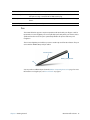
pen
care and maintenance 51
taking care of 51
troubleshooting 55
pen and touch display
configure 22, 55
pen and touch settings 21
pen bay 12
pen bay release button 12
pen tether 17
pen tether anchor 12
power adapter port 13
power button 12, 40
blinking 54
change behavior 26
62