1
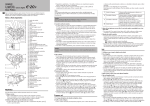
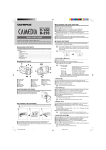
Names of parts
Lens
Extends automatically
when you open the
lens barrier.
Flash
Shortcut menus
When you turn on the camera and press
, the top menu is displayed on the
monitor. The functions of this camera are set from the menus.
Shooting mode
Pops up when you
open the lens barrier.
Press
Connector cover
Zoom
lever
USB connector
.
Playback mode
When the still picture
shooting mode is selected
When the movie recording
mode is selected
DRIVE
DRIVE
The top menu is displayed.
MODE MENU
Lens barrier
MODE MENU
DC-IN jack
Green lamp
Card cover
Lets you shoot one frame at a time (normal shooting).
Shortcut Menus
Mode Menu
• Let you quickly access the most
frequently used menu settings.
• Display operational buttons at
the bottom of the screen, and let
you select items by pressing
.
• Lets you access the menu
selections to set the metering,
white balance, etc.
• Categorizes the settings into 4 tabs.
• Displays the CAMERA,
PICTURE, CARD and SETUP
tabs. Select the desired tab on
the left of the screen by pressing
.
Strap eyelet
Monitor
(OK/Menu) button
Tabs
SEt CARD PIC CAMERA
SHQ 1600*1208
HQ 1600*1200
SQ1 1024*768
SQ2 640*480
CANCEL SELECt GO
Tripod socket
DIGItAL ZOOM
MEtERING
3
Press
to select a
tab, then press
to
display the menu.
SEt CARD PIC CAMERA
Lets you combine two still pictures taken in succession
into one picture.
PANORAMA
PICTURE tab
WB
Erases a selected picture.
Allows panorama pictures to be taken with Olympus
CAMEDIA-brand SmartMedia cards.
CARD SEtUP
SETUP tab
to select a tab
Shooting mode
Playback mode
PLAY tab
EDIT tab
CAMERA tab
PICTURE tab
CARD tab
SETUP tab
To return to select a
.
tab, press
CARD tab
DIGItAL ZOOM
MEtERING
SETUP tab
PLAY tab
Protects pictures from accidental erasure.
Rotates pictures 90 degrees clockwise or counterclockwise.
CAMERA tab
DIGItAL ZOOM
MEtERING
or
To return to
select an item,
press
or
.
DIGItAL ZOOM
MEtERING
Adjusts the brightness of the image (Exposure
compensation).
OFF
ON
DIGITAL ZOOM
METERING
Extends the maximum optical zoom, making possible up
to approximately 5x zoom shooting with the digital zoom
function.
Selects the area of the image that will be used to
determine exposure or image brightness from the two
available settings: ESP or
(spot metering).
DIGItAL ZOOM
MEtERING
OFF
ON
To close the menu,
press
twice.
WB
REC VIEW
EDIT tab
BLACK & WHITE
Creates black and white pictures.
SEPIA
Creates sepia-toned pictures.
INDEX
Creates an index picture of a movie in 9 frames.
Makes the file size smaller.
CARD SETUP
Formats a card.
Erases all image data stored on the card.
SETUP tab
Formats a card.
ALL RESET
Selects whether to save the current camera settings when
you turn off the power.
Turns the beep sound (used for warnings, etc.) on and off.
SETUP tab
ALL RESET
If you want to save the settings after the camera is turned off,
set All Reset to OFF.
Sets the appropriate white balance according to the light
source.
CARD tab
CARD SETUP
Stores printing information required for DPOF printers on the
card.
CARD tab
PICTURE tab
ALL RESEt
REC VIEW
Mode menu functions are categorized into 4 tabs. Use
and display the respective functions.
DIGItAL ZOOM
MEtERING
The green frame moves
to the selected item.
CARD tab
Press
to
select the setting.
Setting is completed
when the setting has
been selected.
SEt CARD PIC CAMERA
FUNCtION
DIGItAL ZOOM
MEtERING
SEt CARD PICtURE CAM
MODE MENU
SEt CARD PIC CAM
DRIVE
SEt CARD PIC CAMERA
CAMERA tab
4
Press
to select
the desired item, then press
to display the available
setting selections.
SEt CARD PIC CAMERA
Top menu
2
ERASE
FUNCTION
Mode menus
SEt CARD PIC CAMERA
Press
to display the
.
top menu, then press
Displays all the shooting information on the monitor.
Self-portrait mode:
Lets you take a picture of yourself while holding the
camera.
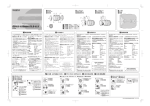
How to use the menus
1
INFO
Lets you select the resolution and the quality of the image.
Still picture
: SHQ, HQ, SQ1 and SQ2
Movie
: HQ, SQ
SEt CARD PIC CAMERA
Turns the camera on and
off in the playback mode.
Plays back a movie.
2 IN 1
Arrow pad
Displays all recorded pictures in slide-show fashion.
MOVIE PLAYBACK
Lets you shoot movies.
Battery
compartment
cover
(Monitor) button
ERASE
DRIVE
Select each menu using
the arrow pad.
Orange lamp
AF target mark
MODE MENU
INFO
ERASE
Lets you shoot pictures in succession.
Viewfinder
MODE MENU
INFO
MODE MENU
FUNCtION
Turns the camera on and
off in the shooting mode.
Self-timer lamp
When a movie is played
back
MOVIE PLAYBACK
FUNCtION
DRIVE
VIDEO
OUT jack
When a still picture is
played back
SEt CARD EDIt PLAY
Shutter
button
Using the menus and tabs
Selects whether to save the current camera settings when
you turn off the power.
Selects the number of frames in the index display.
Turns the beep sound (used for warnings, etc.) on and off.
Sets the date and time.
Selects whether to display pictures on the monitor while
saving them.
Adjusts the brightness of the monitor.
Sets the date and time.
Adjusts the brightness of the monitor.