1
02.4.22 11:34 AM
Page 2
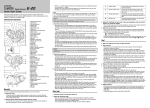
Buttons and Dial
Menu functions
Moving around the Menu screen
Zoom lever
Shooting W/T
Playback
/
: Zooms in/out.
: Displays multiple pictures at the same time (Index-display), or enlarges
pictures (close-up playback).
1
2
Top menu (Mode dial: “P”)
3
ISO
Press
Shutter button
Focuses (half press) or shoots (fully press).
Mode dial
Flash switch
Pops up the flash.
Viewfinder
Shooting : View subjects while shooting.
Playback : Displays recorded images.
Full-auto
Landscape-Portrait
Sports
Portrait
P/A/S/M
(Program/Aperture
priority/Shutter priority/
Manual shooting)
My mode
Playback
:
:
:
:
:
MODE MENU
Note:
The Top menu and available
menu
functions
vary
depending on the mode.
(See the Reference Manual
for more details.)
Full automatic exposure with one press of the shutter button.
Both subject and background are in focus.
Suitable for capturing fast-moving action without blurring.
Renders in-focus subject against a blurred background.
The camera sets optimal focusing and exposure, or the user sets
aperture and/or shutter speed manually.
: Activates your customized settings.
: Records movies.
: Plays back a picture.
to select
to select
WB
Adjust the diopter for the best viewfinder focus.
AUTO
P
to enter each menu
1.0 x3
BKT
DIGITAL ZOOM OFF
(Aperture priority auto), S (Shutter priority auto), or M
(Manual mode).
Adjusts the flash intensity.
CAM
Brings up CAMERA menu
PIC
Brings up PICTURE menu
CARD
Brings up CARD menu
SET
Brings up SETUP menu
Menu functions during playback
CAMERA
ISO Adjusts the ISO sensitivity. (AUTO/100/200/400)
P/A/S/M Exposure mode can be selected from P ( Program auto), A
BKT Sets the conditions for Auto bracketing.
DIGITAL Combining the digital zoom with the 8x optical zoom, makes
ZOOM possible zoom magnification up to approx. 24x (equivalent to
Diopter adjustment dial
ISO
P/A/S/M
The top menu functions can be changed to
your liking in the “P/A/S/M” and
modes
(SHORT CUT setting).
Menu functions during shooting
4
If you select MODE MENU in step 2
SET CARD PIC CAMERA
1 C720-QSG-EN
(still pictures)
Runs through all saved pictures one after another (slide-show).
MOVIE PLAY (movies)
MOVIE Plays back movies.
PLAYBACK
INDEX Shows 9-frame indexes of still-shots from movies in order to
easily check the movies’ contents.
40 mm - 320 mm on a 35 mm camera).
DRIVE button
Shooting
DRIVE
Playback
: Selects sequential mode.
No indication Single-frame shooting
Shoots pictures sequentially. Focus, exposure and white balance are locked at the first frame.
Shoots pictures sequentially. Focus is locked automatically for each frame.
Self-timer shooting
BKT
Shoots pictures sequentially. Exposure is changed automatically for each frame (auto-bracketing).
: Erases pictures one-by-one.
Macro/Spot button
Shooting
Playback
: Activates macro mode or metering mode.
●
Macro (close-up) shooting
Wide: 0.1 m - 0.6 m (0.3 ft - 1.9 ft)/Tele: 1.0 m - 2.0 m (3.2 ft - 6.5 ft)
●
Spot metering
Meters within the AF target on the viewfinder. (Normally, digital ESP is activated.
Digital ESP meters the center of the subject and the area around it.)
●
During macro mode shooting, spot metering is activated.
: Print reserve
Flash mode button
Shooting
OK/Menu button
Displays the menu screen or sets selected
menu items.
Monitor button
● Turns the monitor on/off.
● Press quickly two times to play back the last recorded
image.
Monitor
Shooting : View subjects while shooting.
Playback : Displays recorded images.
POWER switch
Turns the camera on/off.
INFO
PANORAMA Enables you to take panorama pictures using the card’s
/
Playback
: Selects flash modes. (Normally, the flash fires in low-light
and backlight conditions.)
Minimizes “red-eye” phenomena.
Always fires.
Adjusts the flash for slow shutter speeds.
Adjusts the flash for slow shutter speeds and
minimizes “red-eye”.
Prevents the flash from firing (only when it is
pushed down into the camera).
: Prevents pictures from being erased accidentally.
AE lock/Custom button
Shooting
Playback
: AEL Locks exposure.
Performs whichever function you have set for it.
: Rotates a picture.
panorama function.
2 in 1 Combines two pictures taken in succession and stores them
as a single picture
PICTURE
Sets the record mode resolution. (TIFF/SHQ/HQ/SQ1/SQ2)
WB Adjusts the white balance according to the light source.
SHARPNESS Adjusts the sharpness of images.
CONTRAST Adjusts the contrast of images.
Menu
: Selects/adjusts the menu functions and items.
Shooting : Sets aperture/shutter speed/exposure compensation values.
Playback : Selects pictures to be displayed.
EDIT (still pictures)
BLACK& Creates black and white pictures.
WHITE
SEPIA Creates sepia-toned pictures.
Makes the file size smaller.
CARD
CARD
CARD SETUP Formats cards (all images on the card are deleted).
CARD SETUP Formats cards (FORMAT), or erases all images on them
(ALL ERASE).
SETUP
SETUP
ALL RESET Selects whether to keep the current camera settings when
you turn off the power.
INFO Changes the amount of shooting information displayed on
the viewfinder/monitor.
Turns off the beep sound (used for warnings, etc.).
REC VIEW Selects whether to display images while saving them to a
card.
mode.
MY MODE Customizes settings, which are activated in the
SETUP
SLEEP Sets the sleep timer.
FILE NAME Determines how files and folders will be named for saved
ALL RESET Selects whether to keep the current camera settings when
you turn the camera off.
Turns off the beep sound (used for warning, etc.).
Adjusts the brightness of the viewfinder/monitor.
Sets the date and time.
Selects the number of frames in the index display. (4/9/16frame)
images. (RESET/ AUTO)
PIXEL Checks the CCD and image processing circuit for errors.
MAPPING
Adjusts the brightness of the viewfinder/monitor.
Sets the date and time.
BATTERY Enables camera operation with reduced power consumption.
SAVE
SHORT CUT Lets you assign frequently-used functions as shortcut menus
on the top menu.
CUSTOM Lets you assign a frequently used function to the camera’s
BUTTON custom button.
Arrow pad
Changes the amount of shooting information displayed on the viewfinder/
monitor.