1
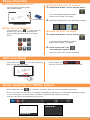
Save the data
[ Notice]
・You can not save the data into display.
If you want to save the data, please prepare USB
flash drive.
・If you want to use USB flash drive with security,
please use a drive with hardware security. You can not use
a drive with software security since security software
can not be installed into display.
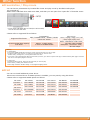
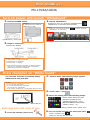
4. Select the file save location (USB flash drive)
and touch “OK”.
1. Insert USB flash drive.
USB I/F
5. Touch “OK”.
*If you insert USB flash drive to USB I/F of bottom side,
You can not save the data.
2.
Touch “Save” icon
on “Square menu”.
[Notice]
When you want to change file name, software key board appear
by touching file name space and then you can change it
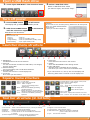
3. Select the save method.
・Save as a new file:
・Save PDF:
・Save to the same file:
・Save image:
*”Save as a new file” and “Save to the same file”,
it save as SWSX format and you can build again.
*”Save image”, it save as BMP/JPEG/PNG format
so you can not build again.
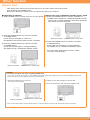
[Notice]
Format of “Save as image” is set by “sheet” tab on setting
of “Tool bar” in bottom
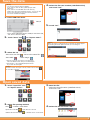
Open saved data
1. Touch “Open file” icon
3. Read the file.
on “Square menu”.
・Select the saved location (USB flash drive)
and touch “OK”.
2. Select file opening method.
・New
: Create a new sheet
・Open as a new file
4. Select the file and touch “OK”.
: Open data as a new file
・Add to the current sheet
: Add data to the current sheet
3