1
Example Program for Crestron - Setup Guide -
Introduction
This guide is a step-by-step setup guide to setting up the Yamaha Commercial Audio
demonstration programming for Crestron.
The program was written to demonstrate the capabilities of Yamaha remote control
enabled devices at exhibitions. We have made the code available to assist programmers
with example code. You are free to use this code in your own project.
The programs have multi-lingual capability and can be configured for different number of
devices present.
Please read the caution information on the Yamaha website carefully before
proceeding to read on.
Skill Pre-requisites
This guide assumes you are an experienced Crestron programmer and have knowledge of
the Yamaha Commercial Audio products which you wish to control. For some products,
knowledge of RS-232, MIDI and basic Ethernet networking will also be necessary. The
programming is provided "as is" without technical support from Yamaha as an additional
resource.
Hardware Pre-requisites
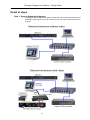
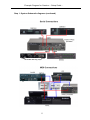
The programming assumes you have some or all of the following hardware.
Crestron
PRO2 processor
TPS-12W touch panel
CNPWSI-75 power supply for touch panel (only required for video playback)
TPMC-CH-IMC break-in-box (only required for video playback)
Yamaha
01V96
(MIDI)
LS9
(MIDI)
M7CL
(MIDI)
DME24N/DME64N
(RS-232)
DME4io-C
(Ethernet)
IMX644
(RS-232)
BD-S2900 Blu-ray player
(RS-232)
Other
Unmanaged Ethernet network switch (10/100Mb)
Kenton Electronics THRU-5 MIDI thru device *
Kenton Electronics MERGE-4 5 MIDI merge device *
*only necessary if multiple consoles are required to be controlled simultaneously.
The programming has been optimised for this hardware. Other Crestron processors or
touch screens may be substituted, if the programming is modified suitably and re-compiled,
but as this operation has not been tested, no guarantee of performance can be given.
1