1
Table of Contents
Proprietary Statement ................................................. 5
Introduction to the QL and QL Plus Series ............... 7
Unpacking and Inspection .................................................... 7
Reporting Damage ................................................................ 7
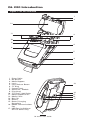
QL 220 Introduction ..................................................... 8
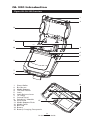
QL 320 Introduction ..................................................... 9
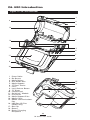
QL 420 Introduction ................................................... 10
Getting Ready to Print ................................................ 11
Battery ................................................................................. 11
Installing the Battery .................................................................................. 11
Charging the Battery .................................................................................. 12
Model LI 72 Single Battery Charger ..................................................... 12
Model UCLI72-4 Quad Charger ............................................................ 13
Battery Safety ............................................................................................. 14
Charger Safety ........................................................................................... 15
Loading the Media .............................................................. 16
Installing the Media ................................................................................... 16
Operator Controls ............................................................... 21
Standard Keypad ....................................................................................... 21
LCD Control Panel ...................................................................................... 23
Verify the Printer Is Working ............................................... 26
Printing a Configuration Label ................................................................... 26
Connecting the Printer ........................................................ 26
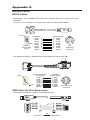
Cable Communications ............................................................................. 27
RS232C Communications ..................................................................... 27
USB Communications (QL Plus units only) ......................................... 27
Providing Strain Relief for Communications Cable ............................ 28
IR Communications ................................................................................... 30
Wireless Communications with Bluetooth™ using ZBR3 Radio .............. 31
Wireless Local Area Network (WLAN) Module Using CF Radio .............. 33
QL 320/320 Plus Wireless Local Area Network Module Using PCMCIA
Radio .......................................................................................................... 35
QL 420/420 Plus Wireless Local Area Network Module Using PCMCIA
Radio .......................................................................................................... 37
Frequency Hopping Wireless Local Area Network Module Using PCMCIA
Radio .......................................................................................................... 39
WLAN Overview ................................................................. 41
Setting Up the Software ..................................................... 42
Using the Accessories ........................................................ 43
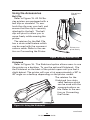
Belt Clip ...................................................................................................... 43
Kickstand .................................................................................................... 43
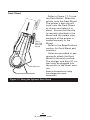
Desk Stand ................................................................................................. 44
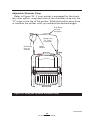
Adjustable Shoulder Strap ........................................................................ 45
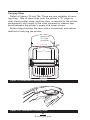
Carrying Strap ............................................................................................ 46
Preventive Maintenance ............................................ 47
3
QL Series User Guide