1
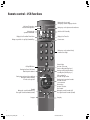
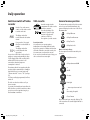
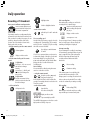
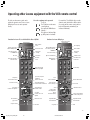
Remote control – VCR functions
During play: select sound
During stop: station language selection
Indicator: TV operation
Indicator: DVD operation
During stop: select picture and sound source
DVD
Select set to be
operated TV/DVD/VCR
Display/close ShowView-Timer Menu
Control 201 VTR
TV
Switch on/off in Standby
V=
SV
LP
Display/close Timer list
000
Counter reset
During stop: switch to Long Play/Standard Play
1
2
3
4
5
6
7
8
9
0
Call up VCR Menu
During play: Pause (still frame)
/frame-by-frame advance
During stop: station selection up/down
During play: manual tracking
In menu: select position
Rewind
During play: search backwards (x 3)
Press again: search backwards (normal)
Stop tape
T
M
OK
E
i
During stop: select station directly
In menu: enter digits
Status display
In menu: close menu
Start recording (and Play key)
During recording: add 30 minutes
recording time (and Play key)
Call up station list
in menu: call up/confirm
During play: slow motion forwards
In menu: select/set
or to next menu
Reverse play
In menu: select/set
Fast forward
During play: search forwards (x 2)
Press again: search forwards (normal)
Start play
3
BA_VCR_31251_020EU_GB2
3
3
17.04.2003, 15:29 Uhr