1
OPEN LOCK
1. Enter valid combination.
2. For Dual User access, enter the second valid combination.
3. Open the container within 4 seconds.
TIME DELAY DISPLAY
The time display will operate during a time delay period and opening window. The time
display format is mm:ss (minutes and seconds.) The default device operation is set to
count down for the time delay period and count up for the opening window. To change
the counting direction, see section on CHANGE COUNTING DIRECTION.
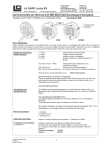
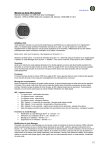
Figure 1
CHANGE COUNTING DIRECTION
Two jumper switches are available on the control card of
the entry device to control the counting direction of the LCD
display for time delay and open window.
No jumper = Count up
Jumper on = Count down
The device is shipped with a jumper on the switch for time
delay and no jumper on the switch for the opening window
as shown in the photo (Figure 1); therefore, the default status
of the device is that time delay counts down and the opening
Jumper On
window counts up.
- Delay
An additional jumper is included in the hardware pack with
switch =
the entry device. You can change the counting direction(s)
Count Down
by adding another jumper, by switching the position of the
original jumper, or by removing the original jumper.
No Jumper
- Open
switch =
Count Up
Note: To remove the back cover, use a medium-sized Phillips head screwdriver. If you
change the jumper settings, they will not be recognized until the next power up of the
entry device. Therefore, you must remove the battery if installed and drain the remaining
power by holding and pressing a key or by pressing multiple keys continuously.
OPEN LOCK WITH TIME DELAY
1. Enter valid combination. The time delay display will be activated. (See TIME
DELAY DISPLAY.)
2. Once the Time Delay has expired and the lock has entered the “open window”, enter
valid combination again.
3. For Dual User access, enter the second valid combination.
4. Open the container within 4 seconds.
TIME DELAY OVERRIDE
This feature enables a User to override Time Delay. The feature must be programmed
when the lock is set up. Refer to the Manager instructions for more detail.
If operating in Dual Combo Mode, the manager or a user combination must first be
entered, then the override combination.
(P/N) 737.098 Rev A • 04/09
© copyright 2009
Kaba Mas LLC
Page 2 of 4