1
1. Function "LOAD ONE SONG"
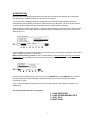
Please select "LOAD ONE SONG" on page 2 of DISK mode. After pressing cursor position key A you
can choose between the floppy disk drive and hard disk partition by using the VALUE dial or the
DOWN/UP keys. Now use cursor position key B or C to call up the table of contents of the selected
partition.
Songs can be selected alphabetically as well as numerically (song location number):
If you are used to assigning the songs of your repertoire to fixed memory locations on your mass
storage device (hard disk) you can do the same with the hard disk of your i2/i3. Load the songs one
after another in the desired order. The memory locations (song numbers) will be kept unchanged until
you delete the files.
Select the hard disk partition and use cursor position key B or C to call up the corresponding directory
(table of contents).
SELECTING SONGS NUMERICALLY
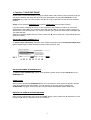
To select songs numerically, hold down cusor position key D and use the Arrangement/Style keys
(DATA ENTRY keys) to enter the desired song number (see ill. 3, 3.1).
DISK 2: LOAD ONE
Load One Style
Load One B.Seq
Load One Drum Kit
Load Std MIDI File
Load One Program
Load
Load One
One Song
Song
Load One Pattern
Load One Arrangement
ill. 3
HD-D:
----------- ---
000
Song-
k
S0
LOAD
A B C D E F G H
SELECTING SONGS ALPHABETICALLY
To select songs alphabetically, press cursor position key B or C and use the VALUE dial or the
DOWN/UP keys.
SONG START
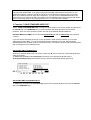
After you have pressed the START/STOP key, the user interface of the sequencer appears and the
song will be played back automatically. You can stop the song at any point by pressing the
START/STOP key again. At the end of the song the display automatically enters DISK mode.
EDITING THE SONG IN SEQUENCER MODE
After you have selected the song, press the "LOAD" button (cursor position key H, followed by cursor
position key E and F) to edit the song in the sequencer.
3