1
QuickSpecs
HP ProBook 6450b Notebook PC
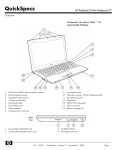
HP ProBook 6550b Notebook PC
Overview
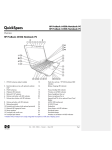
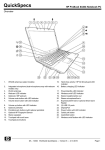
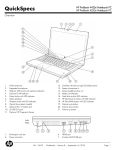
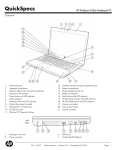
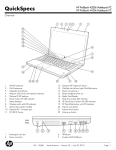
HP ProBook 6550b Notebook PC
1.
WWAN antennas (select models)
16. Touchpad pick buttons
2.
Dual-microphone array with optional webcam only*
17. Hard drive activity / HP 3D DriveGuard LED indicator
3.
WLAN antennas
18. Battery charging LED indicator
4.
Webcam LED indicator
19. Power/standby LED indicator
5.
Optional 2 MP webcam
20. Wireless on/off LED indicator
6.
Volume mute button with LED indicator
21. Stereo headphone/line out
7.
Volume down button with LED indicator
22. Stereo microphone/line in
8.
Volume up button with LED indicator
23. ExpressCard/54 slot or optional Smart Card Reader
9.
Calculator button
24. eSATA/USB 2.0 combo port
10. Separate numeric keypad
25. (2) USB 2.0 ports
11. Optional pointstick
26. DisplayPort
12. Pointstick pick buttons (with optional pointstick)
27. Power button with LED indicator
13. Optional HP Fingerprint Sensor
28. QuickLook button
14. Stereo speakers
29. QuickWeb button
15. Touchpad with scroll zone
30. Wireless on/off button with LED indicator
* Models without webcam have single integrated microphone on left side of display panel.
DA - 13616
Canada — Version 16 — February 15, 2012
Page 3