1
2 TROUBLESHOOTING FOR COPYING
Copying Problems
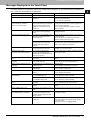
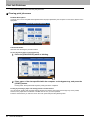
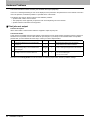
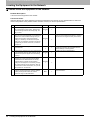
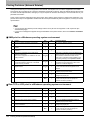
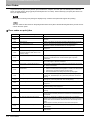
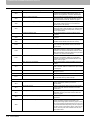
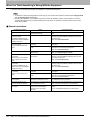
See the table below when you have a problem in operating copy function or have an unexpected copy output.
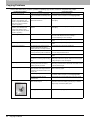
Problem Description
Corrective Action
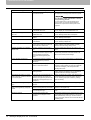
Functions cannot be set.
Another function that is unavailable
for the combination has already been
set.
Some functions cannot be combined.
For details, refer to Chapter 8 of the Copying Guide.
Copying stops while scanning the
originals. (The message “The
number of originals exceeds the
limits Will you print out stored
originals?” appears.)
The number of scanned pages has
reached the maximum.
To copy the scanned images, press [YES]. To cancel,
press [NO].
Copying stops while scanning the
originals. (The message “Not
enough Work Space to store
originals Will you print out stored
originals?” appears.)
No available internal memory
remains.
To copy the scanned images, press [YES]. To cancel,
press [NO].
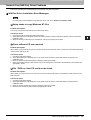
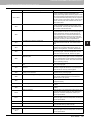
Copied image is too light.
No toner is left.
The message “Install new toner cartridge” appears when
no toner is left. Replace the toner cartridge.
P.59 “Replacing a Toner Cartridge”
Copy density is set too light.
Darken the density manually or try the automatic density
mode.
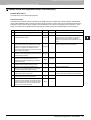
Copied image is too dark.
Copy density is set too dark.
Lighten the density manually or try the automatic density
mode.
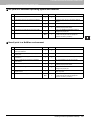
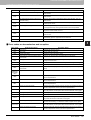
Copied image has stains.
The Original Cover (optional) or the
Reversing Automatic Document
Feeder (optional) is not fully lowered.
Lower them fully to block the outside light.
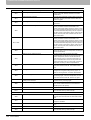
The original glass, platen sheet,
scanning area and guide are stained.
Clean them.
P.126 “Regular Maintenance”
The copy density is set too dark.
Lighten the density manually or try the automatic density
mode.
A transparent original such as a
transparency or tracing paper is being
used.
To copy a transparent original clearly, put a sheet of blank,
white paper behind the original. Make sure that the paper
is large enough to cover the original.
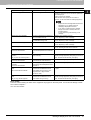
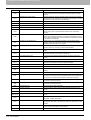
Copy image is skewed.
The original is sent from the
Reversing Automatic Document
Feeder (optional) at a skew.
Replace the original while aligning the side guides of the
Reversing Automatic Document Feeder to its width so that
it will be placed straight.
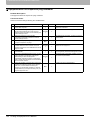
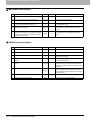
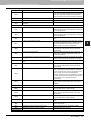
Copied image is partially missing.
The size or orientation of the copy
paper and that of the original are not
consistent. The reduction ratio is not
properly set.
Fit the copy paper size to the original or set the reduction
ratio for the copy paper.
The binding margin is too wide.
Set the binding margin width to fully cover the original.
For details, refer to Chapter 4 of the Copying Guide.
The original is larger than the
printable area.
The outside part of the printable area cannot be copied.
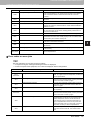
There is a gap between the original
glass and the original.
Lower the Original Cover (optional) or the Reversing
Automatic Document Feeder (optional) fully so that the
original fully contacts the platen glass.
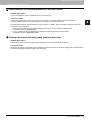
The copy paper is damp.
Replace it with dry copy paper.
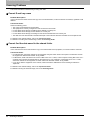
Copied image is blurred.
80
Cause
Copying Problems