1
Status Codes
◆
If the path specified for the disk storage unit is in the root file system or system
device but does not need to be, use the Change Storage Unit dialog to specify a
different (non-root) path in a mounted file system.
◆
Check the NetBackup Problems report. Try to determine the file and why the error
occurred. A possible cause is a permission problem with the file. For detailed
troubleshooting information, create a debug log directory for the process that
returned this status code. Then, retry the operation, and check the resulting debug
log.
◆
For NetBackup Lotus Notes:
Point-In-Time restore jobs initiated from the master server, using either the
NetBackup Administration Console or the Backup, Archive, and Restore interface,
may fail with a status 12 as reported in the NetBackup tar log file (in
install_path\NetBackup\logs\tar folder on Windows or
/usr/openv/netbackup/logs/tar folder on UNIX). If the install path of the
NetBackup master server is different from the install path of the NetBackup client, the
automatic restore of Lotus transaction log extents during recovery of the Lotus
database will fail. Note that the Activity Monitor will show a status 0 (successful). The
tar log on the client, however, will show success for the restore but a failure (status 12)
for the Lotus database recovery.
Perform the restore job from the Backup, Archive, and Restore interface on the
NetBackup client.
◆
For NetBackup Advanced Client:
Status code 12 may appear in the /usr/openv/netbackup/logs/bptm or bpdm
log, accompanied by the following:
tpc_read_config failed: cannot open file
/usr/openv/volmgr/database/3pc.conf
This may indicate that the policy is configured with either NetBackup Media Server
or Third-Party Copy Device as the offhost backup method, but that the 3pc.conf
file does not exist or is in the wrong location. For instructions on creating the
3pc.conf file, refer to the latest version of the NetBackup Advanced Client System
Administrator’s Guide.
◆
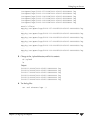
For a FlashBackup policy, if the CACHE= entry follows the source data entry (the
entry for the data to back up), the backup will fail with status code 12. Messages such
as the following will appear in the /usr/openv/netbackup/logs/bpbkar logs on
the client
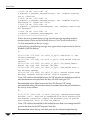
09:55:33.941 [6092] <16> bpfsmap: ERR - open_snapdisk: NBU snapshot enable failed error 3
09:55:33.942 [6092] <32> bpfsmap: FTL - bpfsmap: can't open snapshot disk /dev/rdsk/c4t1d0s3 errno 0
Chapter 5, NetBackup Status Codes and Messages
131