1
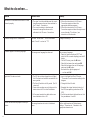
What to do when ...
Problem
Possible cause
Remedy
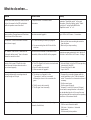
Various menu items cannot be called (shown in
gray) or the menus for the EPG and teletext
modes of operation cannot be called
”Simplified control” activated in main
information
Deactivate ”Simplified control” in the main
information. Press the i-button, select ”Select
control level” and call with OK. Set the
”Simplified control” to ”no”.
Timer recording, Change timer and Clear timer
are not shown in the Video menu
No video recorder logged in
Log in VCR in the TV menu – Connections.
”Connections” cannot be called in the Video
menu (shown in gray)
a) A timer recording is currently in progress
a) Wait until the timer recording has ended or
clear the timer.
b) Wait until you stop recording.
b) You are recording from the TV set with the
video bar
The ”Stations” item in the TV menu and the
”Automatic station search” item in the main
information cannot be called
The child lock is activated. If these menus were
accessible, children could still set the programs.
Control of the Loewe VCR with the video
control bar and the timer does not work or
does not work properly
a) The VCR’s Digital Link function is not activated a) Activate Digital Link in the VCR (see operating
or not possible
instructions of the VCR)
b) Euro-AV cable not connected
b) Connect the Euro-AV cable
c) Video recorder not logged in
c) Log in the VCR
General problems with connecting external
devices through an AV input
a) The device is not logged in in the
”Connections” menu or is connected
differently to shown in the connection diagram
b) The AV norm is set incorrectly
c) The AV signal is set incorrectly
Picture shifted horizontally
The TV set is in the Southern hemisphere (e.g.
Australia, South Africa)
Deactivate program-related child lock: Switch off
child lock or enter PIN in the TV menu - Settings.
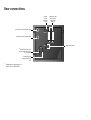
a) Compare the connection diagram with the
actual installation in the ”Main information”
under ”Connections” and connect as shown if
necessary.
b) Set the correct norm.
c) Set the correct AV signal.
If ”Automatic” is set for AV norm or AV signal,
this can lead to wrong detection in the case of
non-standardized signals. In this case the norm
and signal must be set according to the operating
instructions of the external device.
Set the horizontal position:
1. Call the main information with i
2. Call Index – Set picture – Horizontal
displacement
3. Set horizontal picture position.
21