1
B) OPERATION
Code entering procedure
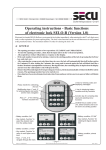
The procedure by which individual code entries are made is cursor-controlled. Before entering a figure, one of the 10 numbers on the
display will show up as a blinking black rectangle. The lock selects the space for the first figure at random. To move the cursor, use
direction keys “2” (up), “4” (left), “6” (right), “8” (down). When, at the end of the movement, the cursor blinks in the position of
the figure to be entered, complete entering of the figure by pressing “5”.
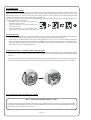
The following example shows one possibility of entering the figure 2 when the random starting position of the blinking black cursor
rectangle happens to be on the figure 6:
1. Press cursor direction key “4” once to move the cursor
to the left from the 6 to the 5.
2. Press cursor direction key “2” once to move the cursor
up from the 5 to the 2.
3. Press code entering key “5” once to complete selecting the figure 2 as one of the figures of the secret code.
Clearing the lock
1.
2.
3.
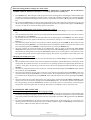
Press On/Enter. When the lock is ready for operation, you will be asked to enter the code eight seconds after the status of the
opening counter is displayed. You can abort the opening counter indication by pressing any number key.
Now enter the 7- or 8-digit numerical code (factory setting: administrator code 1 2 3 4 5 6 7). Each successfully entered figure
will be confirmed by a star appearing underneath the word CODE:. After entering the last digit, the code is validated by the lock.
If the lock is able to match the entry with a previously programmed code, it will prompt the operator for five seconds to turn the
round input unit and to start unblocking the lock.
Unblocking the lock - relocking and securing the lock
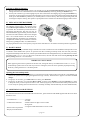
1. To unblock the lock during the five second readiness for opening, turn the round input unit clockwise through a half turn from
its end position. Please note that the input unit can be turned a quarter turn at any time, but that this distance is not enough to unblock
the lock.
2. If the input unit is turned back to its starting position in anti-clockwise direction after the five-second ready-for-opening period,
the lock will return to the blocked position and can only be unblocked after renewed clearing and re-entry of a valid code.
C) CHANGING THE NUMERICAL CODE
TEST – TO BE PERFORMED WITHOUT FAIL!!
For safety reasons, only reprogram the lock with the safe door open and blocked in the open position. Only after you are absolutely
certain that the lock has been reprogrammed successfully and that the lock can be electrically cleared and mechanically unblocked
using the new settings, should the door be closed.
-- page 2 --