1
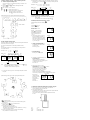
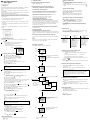
6.0 RND = Random program / random number generator
7.1 Switching times for holiday program are entered like "Standard” switching
commands, see 4.4, but the symbol
for each holiday switching time must
also be entered.
a) without assigned switching times
The random program can be switched separately for channels 1 and 2
manual =
On or =
Off.
The "random" switching times lie within the following fixed values:
max. 60 minutes
min. 5 Minuten
max. 30 minutes
}
RND +
5x
1/
1/
Example for CH 1: 1 2 3 4 5 6 7 (Mon... Sun) 04.00
1 2 3 4 5 6 7 (Mon... Sun) 11.00
Buttons: Prog
#
h+, m+
#
2 = Switch random program on
2 = Switch random program off and return to
automatic program or programmed
RND off
command. See section 6.0 b
Prog
1,
Prog
$
"
"
Possible starting points (per channel) without assigned switching times
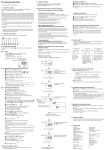
7.2 Start and duration of holiday program
Important: Before the start and the duration of the holiday program
can be entered
You must switch to the current mode using button
.
If no switching times are stored for the holiday program
and button x is clicked, the holiday symbol
blinks.
Entering switching times for the holiday symbol,
see 7. 1
at least 5 minutes
Press button
once and
appears in the display:
The cursor for the current
weekday blinks.
If button
is now pressed the
holiday program (HO=Holiday)
becomes active immediately
and for an unlimited period
- see 7.0 c.
e.g. Wednesday
a) If the holiday program is to start on
the current weekday, the number of
holiday days is entered using "Select".
If the "Select" button is held down for
more than 2 seconds roll mode occurs.
e.g. 10 holiday days
Example:
b) with assigned switching times
The switching times to which the "RND" index has been assigned determine the
start and stop of the random program.
The "random" switching times are within the specified fixed values,
see 6.0 a
b) This entry is stored using button
and the current switching status
is established at the same time in
accordance with
the holiday program.
Example:
The connected consumers, e.g. corridor lighting, is (randomly) switched
on at regular intervals.
Example for CH 1: 4
4
Buttons: Prog
#
(TH)
(TH)
21.00
23.55
Day, Select, h+, m+,
# Prog
$
RND
RND
1, RND
c) Note: Press button
to read the current:
Weekday, time, switching status
Prog
"
Example
"
d) The number of preselected holidays (1)
is decremented daily,
e.g.. d10, d9, d8...
Then the current time is redisplayed.
The switching times for the holiday program
are retained, but are inactive,
see section 7.0c.
RND
& Random
21.00
Note:
switching times%
23.55
After "RND " the switching status of the relay can be
Depending on the situation, an additional
"Standard" command must be programmed.
or
.
c) Of course, the random program can be manually interrupted or indexed
at any time
e) If the holiday program is to start
at a later time (max. 6 days) button
is used to
enter the value.
Select the current day using "Day",
e.g. 1 = Monday and enter the number of
holiday days using "Select", see item 7.2.
This entry is saved using button
And the current mode is established at the same time.
The current day is displayed up to the preselected holiday program.
Day change
possible starting position (per channel) with assigned switching times
When the day
changes (midnight)
the holiday program
starts and the
duration thereof is
displayed,
see section 7.2.
7.3 Premature cancellation/interruption of holiday program
a) If the holiday program has already started, press button once.
The clock switch goes into the current mode.
b) with assigned switching times
The switching times to which the "RND" index has been assigned determine
the start and stop of the random program.
The "random" switching times are within the specified fixed values,
see 6.0 a.
7.0
= Holiday program
a) The holiday program has priority over the "standard week program",
see section 4.4
b) The holiday program
can only be entered if all 7
weekdays have been selected.
c) The holiday program is only active if
- switching times have been stored, see 7.1
- the duration of the holiday period has been preselected (1...99 days)
- or has been defined as unlimite
d) The start of the holiday program can be the current weekday,
or be preselected for a maximum of 6 days.
red
black
green
white
+1,5 V
0V
switch output CH 1
switch output CH 2