1
Atomic User Guide v0.2
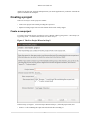
• enter the corpus text via the text field provided after clicking the ... button.
Finally, choose the tokenizer that should be used to tokenize the corpus text (currently, only the TreeTagger
Tokenizer is available), and press Finish.
The corpus text will now be tokenized, and the project created.
Import an existing corpus
In order to import an existing corpus, right-click into the Navigation window and choose Import ... from the
pop-up menu. In the Import Wizard, choose Atomic → Corpus Import. Follow the instructions provided
by the Import Wizard to import a corpus from one of the supported formats. These are currently: CoNLL,
EXMARaLDA, Elan, MMAX2, PAULA, RelANNIS, SaltXML, Treetagger, UAM. The corpus will be
imported, and wrapped in a new project.
Annotation with the Annotation Graph Editor
To open a corpus document of your choice in the Annotation Graph Editor, double-click the file containing
the respective corpus document in the Navigation view. Should you have opened this file with another
editor before, Atomic will have remembered the editor the file was opened with last. In this case, rightclick onto the file, and choose Open With → Annotation Graph Editor from the pop-up menu.
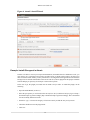
Figure 2. Atomic application window with Annotation Graph Editor.
Opening a corpus document file with the Annotation Graph Editor will also open a new perspective, the
Annotation Graph Perspective. Perspectives consist of a number of GUI elements (views or editors), which
are ordered in a specific way, optimized for a specific task. The Annotation Graph Perspective consists of
the Annotation Graph Editor (6), which is accompanied by three automatically opened views:
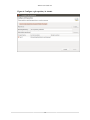
• (2) The Sentence View: Displays a numbered list of sentences making up the corpus document. You can
select sentences for display in the editor by checking the checkbox next to it. Multiple sentences can
be displayed. However, rendering large annotation graphs is an expensive operation and consequently
3