1
MacAnova Version 4.04
2.11 Reading data from a file Although you can type small data sets directly into
MacAnova using vector() and matrix(), it is often more convenient to read data
from a file on your hard or floppy disk. The file might have been created in a word
processor such as Microsoft Word, a text editor such as Edit in DOS, or by a spread sheet
or data base program.
MacAnova can read data only from plain text files (type TEXT on the Macintosh). A
plain text file (sometimes called an ASCII file) is one with no additional information
such as font or point size. Hence, if you use a word processor to create or edit data files
to be read by MacAnova, it is essential that they be saved as Text or ASCII files. In
some programs such as Microsoft Word, you may have to click on a File Format
button to display choices; in others the options may be displayed in the dialog box
brought up by Save or Save As…. If you do not choose a Text format, MacAnova will
probably not be able to read the file.
The MacAnova functions for reading data from a plain text file are vecread() and
matread(). In addition there are two pre-defined macros, readcols and getdata.
All commands which read from a file must have the file name as their first argument.
This must be a quoted string or CHARACTER variable giving the name of the data file. In
the windowed versions (Macintosh, Windows and Motif), if the file name is "", that is,
it consists of two adjacent quotation marks, you are presented with a dialog box with a
scrolling list of files from which you can select the file.
All the commands which read from a text file, including vecread(), matread() and
macroread() can also “read” from MacAnova CHARACTER variables using keyword
phrase string:CharVar as first argument instead of the file name. See Sec. 8.3.2 for
details.
2.11.1 vecread() Function vecread() creates a REAL vector from unstructured
numerical data in a file. The numbers should be separated by blanks or tab characters,
or may be on separate lines. One or more successive question marks (?, ??, ???, ...) in
the file is read as MISSING as are isolated periods (.) and asterisks (*). A exclamation
point “!” is a stopping character and terminates the read. Any other non-numeric
characters such as letters, commas or slashes will be ignored except possibly for printing
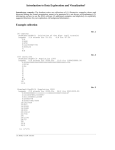
an advisory message. The entire file will be scanned, unless a ! is found. Here is a
listing of a file myfile.dat containing 30 comma-separated values of a variable x that
might be read by vecread():
Data from
600, 555,
246, 504,
662, 892,
10, 20, 3
trees
361, 489,
358, 623,
644,
.,
This line
640, ?? 644, 297, 481, 612, 522
614, 595, 531, 602, 684, 410, 448
431, 472, 513, 603e ! 30, 10
will not be read
The output of vecread() is a REAL vector consisting of the values read.
2-31