1
Introduction
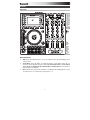
Box Contents
NV
Power Cable
USB Cable
Software Download Card
Quickstart Guide
Safety & Warranty Manual
Support
For the latest information about this product (system requirements, compatibility information,
etc.) and product registration, visit numark.com.
For additional product support, visit numark.com/support.
Quick Start
1. Install the Software
Download and install the latest version of Serato DJ from serato.com.
2. Connect and Start DJing!
Follow this sequence of steps whenever you use NV:
1.
Make sure all devices are off and all faders and gain knobs are set to "zero."
2.
Connect input sources (microphones, CD players, etc.) to the NV.
3.
Connect output devices (power amplifiers, sub-mixer, recorders, etc.) to the NV.
4.
Plug all devices into power sources, and turn on devices in proper order:
•
When starting a session, turn on (1) input sources, (2) NV, (3) output devices.
•
When ending a session, turn off (1) output devices, (2) NV, (3) input sources.
5.
Connect the NV to your computer with the USB cable (included) and to your headphones.
6.
Open Serato DJ and go! For more information on how to use Serato DJ with NV, visit
serato.com/dj/support and select Numark NV.
2