1
Components and Operations
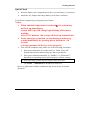
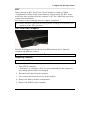
To re-install the modules:
Gently push the module into the slot. Fasten the screw to fix the module. Make
sure the O-rings are firmly fixed. No sealant is necessary for the O-rings.
Hard Disk Drive
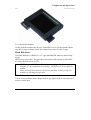
The Hard Disk Drive (HDD) is a 2.5” type standard IDE interface data storage
device.
HDD is user removable. This provides convenience and security. It can ONLY
be removed while power is OFF.
Note: NEVER drop your HDD module or expose it to high temperature, high
humidity, or any hazardous environment. NEVER try to disassemble the
module.
Static discharge may destroy your device and data. Always pick up the
modules by touching the case only.
Touch Screen
Touch screen facilitates direct finger touch or pen input on the screen instead of
mouse or touch pad.
13