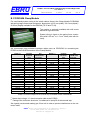
1
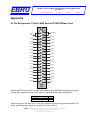
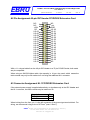
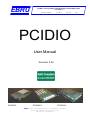
EBRU PCIDIO – PCI Card With 32/64 Optically Isolated Digital I/Os User Manual pcidio-en-um-3v5b.doc 01.12.2014 Rev. 3.5b Side 3 pcidioStartTimer ....................................................................................................................... 31 pcidioStopTimer........................................................................................................................ 31 pcidioSetIRQTimer ................................................................................................................... 32 pcidioSetWatchdogIntervall ....................................................................................................... 32 pcidioGetWatchdogState........................................................................................................... 33 pcidioReset .............................................................................................................................. 34 pcidioGetErrorMsg.................................................................................................................... 34 pcidioEnableIrq......................................................................................................................... 35 pcidioDisableIrq........................................................................................................................ 35 pcidioGetIrq.............................................................................................................................. 36 pcidioResetIrq .......................................................................................................................... 37 5.2 Digital Input Functions .............................................................................................................38 pcidioDIGetChannelState.......................................................................................................... 38 pcidioDIGetByte........................................................................................................................ 38 pcidioDIGetState ...................................................................................................................... 39 pcidioDISetIrqChannelConfiguration .......................................................................................... 39 pcidioDIGetIrqChannelConfiguration .......................................................................................... 40 5.3 Digital Output Functions ..........................................................................................................41 pcidioDOSetChannelState......................................................................................................... 41 pcidioDOSetByte ...................................................................................................................... 41 pcidioDOSetState ..................................................................................................................... 42 pcidioDOServiceChannel .......................................................................................................... 43 Appendix ................................................................................................................................................44 A1 Pin Assignment 37-pin D-SUB Socket PCIDIO32 Base Card.................................................44 A2 Pin Assignment 40-pin IDC Header PCIDIOEX Extension Card ............................................45 A3 Connector Assignment KL1 PCIDIOEX Extension Card .........................................................45 B PCIDIOHM Clamp Module ........................................................................................................46 C DOS Driver ................................................................................................................................47 D Item Numbers............................................................................................................................47 E Support ......................................................................................................................................48 F Customised Models ...................................................................................................................48 G Service Address........................................................................................................................48 H Updates .....................................................................................................................................48 I Revision History........................................................................................................................48 Published by EBRU GmbH, In den Kreuzwiesen 21, D-69250 Schönau, www.ebru.de Copyright EBRU GmbH 2004-2014 All rights reserved. No part of this manual may be copied or edited, diffused or reproduced using electronic systems in any way without the explicit consent of EBRU GmbH. The companies and product names given in this manual are the property of the respective companies. This documentation has been created to describe the use of hardware and software. The manufacturer may make technical changes for improving the product. Important notice! We must draw your attention to the fact that we cannot carry legal responsibility or assume any liability for cons equences of incorrect use or software errors. We always appreciate every notification of errors and all comments and suggestions for improvement etc. EBRU GmbH • Am Laempertsbach 23 • D-99826 Nazza • Germany Tel:+49 36924 30 800 • Fax:+49 36924 42 204 www.ebru.de • info@ebru.de