1
sales@DasOBD2.de
Revision:EasyCoding.V1.1
Nane: EasyCoding
Component: User Manual
Document: Product Document
<Euse.Fundetail.V1.1>
3. Product instruction
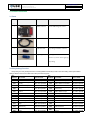
3.1 Parts
Numbe
Picture
Name
Function
r
1
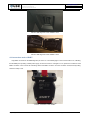
ENET Contactor
Connect OBD diagnosis socket
2
Cable
Connect PC and ENET Contact
3
USB Flash disk
EasyCoding installation software
4
Superdog
Superdog must be inserted in USB
interface of your PC when applying
EasyCoding
3.2 EasyCoding Function
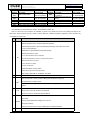
EasyCoding is a newly developed device for reading BMW and Rolls-Royce fault codes and making vehicle personalized
settings. Below is a list of car models and model years that it supports:
Dev.
Platform Car models
F01
BMW 7 Series Sedan
F02
BMW 7 Series Limo
BMW 7 Series High
F03
Security
F04
BMW 7 Series Hybrid
F06
F07
F10
F11
F12
F13
F15
F16
F18
F20
BMW 6 Series Gran Coupe
BMW 5 Series Gran
Turismo
BMW 5 Series Sedan
BMW 5 Series Wagon
BMW 6 Series Convertible
BMW 6 Series Coupe
BMW X5 M Sport
BMW X6 Sports Activity
Croup
BMW 5 Series Sedan
(China Limo)
BMW 1 Series Luxury
Sedan
EasyCoding User Manual V1.1.docx
Year of made
Oct. 2010 upwards
Apr. 2009 upwards
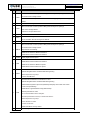
Dev.
Platform Car models
F31
BMW 3 Series Wagon
F32
BMW 3 Series Coupe
Nov. 2011 upwards
Apr. 2012 upwards
F33
F34
Jan. 2013 upwards
F35
Dec. 2012 upwards
Jun. 2009 upwards
Apr. 2011 upwards
May 2012 upwards
F36
F55
F56
F80
Mar. 2012 upwards
May 2014 upwards
F82
F83
Mar. 2014 upwards
F85
Oct. 2010 upwards
F86
Jan. 2013 upwards
RR1
BMW 3 Series Convertible
BMW 3 Series Gran Turismo
BMW 3 Series Gran Coupe
(China Limo)
BMW 4 Series Coupe
MINI Cooper
MINI Cooper
M3 4-Door Sedan
M3 2-Door Coupe
M3 Convertible
BMW X5 M SUV
BMW X6 M SUV
Rolls-Royce luxury sedan
series II
Page 6/20
Year of made
Oct. 2012 upwards
Dec. 2012 upwards
May 2013 upwards
Mar. 2013 upwards
Aug. 2012 upwards
Sep. 2013 upwards
Feb. 2014 upwards
Jan. 2014 upwards
Apr. 2014 upwards
May 2014 upwards
Apr. 2014 upwards
Mar. 2014 upwards
Feb. 2014 upwards
Nov. 2002 upwards