1
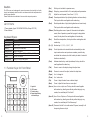
1.2 LCD Screen
1.2
1.2 LCD
LCD Screen
Screen
2.2 Detailed introduction to
Press
eachkey,
function
key,
show relevant
information, press And hold 2.2.1
Press each
function
LCD screen
willLCD
showscreen
relevantwill
information,
press And hold
2.2.1 Select
Select PTZ
PTZ ID:
ID:
Press each function key, LCD screen will show relevant information, press And hold
the key,
relevant
information
will
show
while
release
it
will
disappear.
When
there
speed
dome
or decoder whose ID is 28:
the
key, information
relevant information
show
release
will disappear. When there select
the key,
relevant
will show while will
release
it willwhile
disappear.
Whenitthere
select
speed PTZ
dome
2.2.1 Select
ID:or decoder whose ID is 28:
and holding
each
function
key power-save
will engage the
LCD screen
and relevant
is Pressing
no operation
over 30s,
it will
get into
mode(its
backlight
will be turned
is information
no operation
over
30s, When
it over
will get
into power-save
mode(its
backlight
willmode(its
be
turned backlight will be turned
is no will
operation
30s,
it will
intothey
power-save
appear.
function
keys
are get
released
will disappear.
When
LCD
display
as
protoc
2.2.1 Select PTZ ID:
off ), it will show standby image, details as bellow:
LCD will
will
display
as below(corresponding
below(corresponding
select
speed
dome
or decoder whose IDprotoc
is 28:
there
is
no
operation
within
30
seconds
the
LCD
and
keyboard
will
go
into
power-save
off ), it will show standby image, details as bellow:
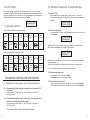
select speed dome or decoder whose ID is 28: press 2, 8, Cam in turn,
off
),
it
will
show
standby
image,
details
as
bellow:
PTZ
addr:0
28 ④protocol
mode (backlight will turn off and standby
image will appear).
LCD will display as below
(corresponding
and baud rate will also be protoc
ptz addr : XXX
LCD
will display
PTZ
addr:0
28 ④ as below(corresponding
ptz
addr : B:2400
XXX
P : PelcoD B : 2400
P:PelcoD
showed).
P : PelcoD B : 2400
P:PelcoD B:2400
1.2 LCD Screen
2.2 Detailed introduction to combined keys
ptz addr : XXX
P:PelcoD B:2400
1.3
Joystick
Control
1.3
Joystick
Control
1.3
Joystick
Control
PTZ addr:0 28 ④
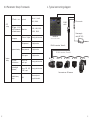
When control speed dome and mounting plate:
When control speed dome and mounting plate:
When control speed dome and mounting plate:
1.3 Joystick Control
Output
Output
Output
Operating Output
Operating Output
Operating
Output
Control
Operating Control Operating Control Operating
Control
Controlplate:
When
control speed Control
dome and mounting
Output
Output
Control
Control
Operating
Operating
Upward
Operating
Upward
Output Downward
Operating
Downward
Control
Output
Left
Left
Control
Operating
Output
Right
Right
Control
P : PelcoD and
B : 2400
2.2.2
2.2.2 set
set and recall
recall pattern:
pattern:
Set
pattern:select
PTZ
pattern:select
PTZ addr.,
addr., press【patte
press【patte
2.2.2
set and recall pattern:
2.2.2 Set and recall pattern:Set
LCD
will
display:
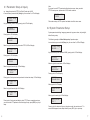
Set pattern: select PTZ addr., press (Pattern) key and hold for more than 3s,
LCD
will display:
Set pattern:select
PTZ addr., press【patte
LCD will display:
PTZ addr: 028 ④
PTZ addr:
028 ④
LCD
willrecord
display:
Pattern
Pattern record
PTZ addr: 028 ④
Pattern record
Operate
joystick to control PTZ moving to r
Output
Operate
to control
PTZ
moving to r
Operate joystick
to control PTZ
moving to joystick
relevant position,
adjust zoom
time.
Operating
Control
After setup, press
(Pattern) key
to finish,
LCD press
will display:
【pattern】key to finish, LC
After
setup,
【pattern】key
to finish,toLCr
After
setup,
press to
Operate
joystick
control PTZ moving
When
control
When
controlSetup
Setupofofkeyboard
keyboard controller:
controller:
When control Setup of keyboard controller:
Operating
Operating
Output
Output
Control
Control
Upward
Operating
Operating
Output
Output
Control
Control
PTZ addr:
02 8 press
④
【pattern】key to finish, LC
After
setup,
PTZ addr:
02 8 ④
Output
Downward
Operating
Output
Operating
Control
Control
Menu
Menu
Menu
Parameter
turned up
down
down
of the left
Operating
Operating
turned
Menu
Parameter
When
control
Setup of
keyboard controller:
turned
up
of
the left
turned
Operating
Output
Control
Operating
Output
Control
Output
Left
Output
Control
Control
Parameter
Parameter
of the right
of the right
Operating
Output
Control
KEYBOARD CONTROLLER
OPERATIONS
— 04 —
— 04 —
Menu
2.1 IntroductionMenu
to single-press keys turned
and combined keysParameter
turned up
of the left
down
4
2.1.1
Single-press key: When single key is pressed, the corresponding PTZ will respond.
Single-press keys include: Near, Far, Tele, Wide, Open, Close, Auto, F1, Run, Esc, joystick.
2.1.2 Combined key operations mean 2 or more keys, or key and joystick are pressed, the corresponding PTZ will respond. — 04 —
Single-press keys include: Near, Far, Tele, Wide, Open, Close, Auto, F1, Run, Esc, joystick.
The operations include: Preset, Pattern, Shot, Cam, Setup.
Right
Pattern stop
Pattern stop
PTZ addr: 02 8 ④
Pattern stop
Recall pattern: press (Run) key PTZ will run in the certain route which recorded
in relevant pattern;
Press any single-press key will stop pattern scan and back to normal status.
—
— 05
05 —
—
— 05 —
Note: This keyboard supports setting one pattern at present.
Output
Operating
2.2.3 Set and recall preset point:
Control
Set preset
point 1: key in (1), press (Preset).
Recall preset point 2: key in (2), press (Shot).
2.2.4 Turn on/Turn off aux function:
Parameter
Turn on: need to open number 1 aux. function, press (1), press (AUX on).
right
Turn of
off:the
need
to close number 1 aux. function, press (1), press (AUX off).
5